
This article provides a comprehensive SE Ranking SEO Content Editor Tool review.
We’ll explore its features, benefits, and potential drawbacks to help you determine if SE Ranking is the ideal SEO platform for your needs.
So, without any further ado, let’s get started.
Quick Takeaway of the SE Ranking SEO Content Editor Tool
- Best for: Teams that want a SERP‑driven “brief → write → optimize → track” workflow inside a full SEO platform, especially when writers work in Google Docs.
- Core strengths: Turns top‑ranking pages into clear briefs (word count, structure, keywords) and then guides optimization in real time with Content Score and quality checks.
- Why writers like it: Keeps SEO guidance, readability, grammar, and plagiarism checks in one editor, so they don’t have to juggle multiple tools while drafting.
- Why SEOs like it: Connects content briefs and drafts to SE Ranking’s keyword, SERP, and performance data, making it easier to prove impact and prioritize updates
What is the SE Ranking SEO Content Editor?
SE Ranking’s Content Editor is an SEO content optimization workspace that helps you create, refine, and optimize articles using insights from top-ranking pages in Google’s search results.
As part of SE Ranking’s broader content marketing and AI SEO platform, the tool analyzes competitive SERPs and turns them into recommendations for word count, structure, headings, keywords, and other content parameters.
Inside the editor, you get real-time guidance via content scores, keyword and term suggestions (including NLP-based terms), and brief/outline features to make your copy more search-engine-friendly and user-focused.
SE Ranking also offers a 14‑day free trial (no credit card required), so you can test the Content Editor and other tools before choosing a paid plan.
How SE Ranking Approaches Content Optimization
Here’s your content broken down heading‑by‑heading:
Data-driven optimization workflow
SE Ranking uses SERP data, keyword metrics, and page audits to guide how you plan, write, and refine content for better relevance and rankings.
Strategic keyword usage
Its keyword research tools surface high‑potential queries so you can naturally integrate relevant terms your audience actually searches for into your content.
Competitor content insights
Competitive research features let you review top‑ranking pages, spot content gaps, and understand which topics, structures, and keywords help leaders in your niche win.
Technical and on-page checks
The on-page checker and website audit highlight issues with content, metadata, and other elements that may hold back your content’s performance.
All-in-one SEO platform
Because these capabilities sit in one platform (content, keywords, competitors, on-page, and audit), SE Ranking supports a holistic approach to content optimization.
SE Ranking SEO Content Editor Features Review
Here is the SE Ranking SEO Content Editor features review.
SERP-driven brief creation
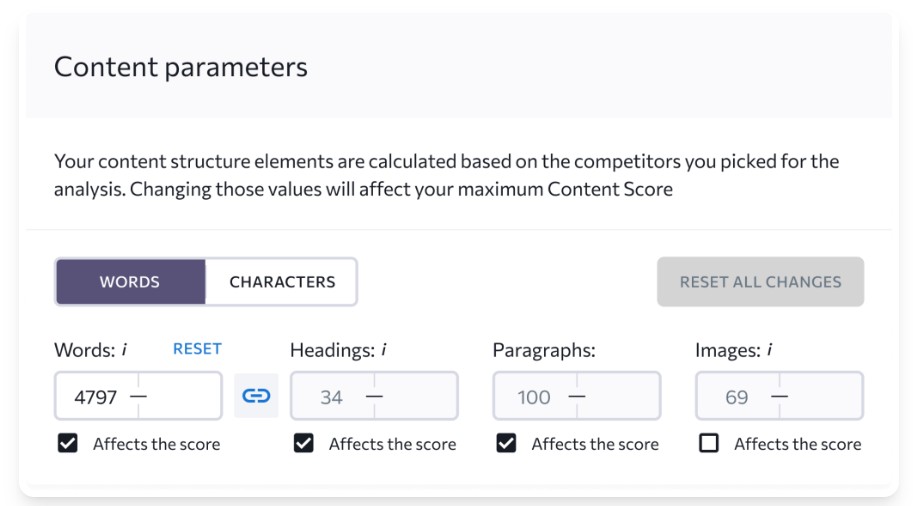
When using SE Ranking SEO Content Editor, I found the SERP-driven brief creation feature particularly helpful. It streamlines the initial stage of content creation by analyzing top-ranking pages for your target keywords and turning them into a brief with recommended word count, headings, and key terms.
This functionality enables you to quickly identify the key topics, questions, and content structures that resonate with your audience and perform well in search engine results.
By leveraging this feature, you can ensure your content is aligned with what search engines prioritize, increasing its chances of ranking higher. This SERP analysis feature in the SEO platform helps in efficient SEO management and makes SE Ranking stand out as a comprehensive SEO tool.
How to use it
Open the SE Ranking SEO Content Editor, create a new article, enter your target keyword, language, and location, then let SE Ranking analyze the SERP to auto-generate your brief settings and recommendations.
Where this helps
This is especially useful when you’re planning new articles, content hubs, or agency briefs and want to base requirements on real SERP data instead of guesswork.
Downside
If you follow the auto-generated brief too strictly, your article can end up very similar to existing top results and lack originality. You still need to layer in unique angles, examples, and expertise to avoid blending into the SERP.
Keyword and Term Recommendations
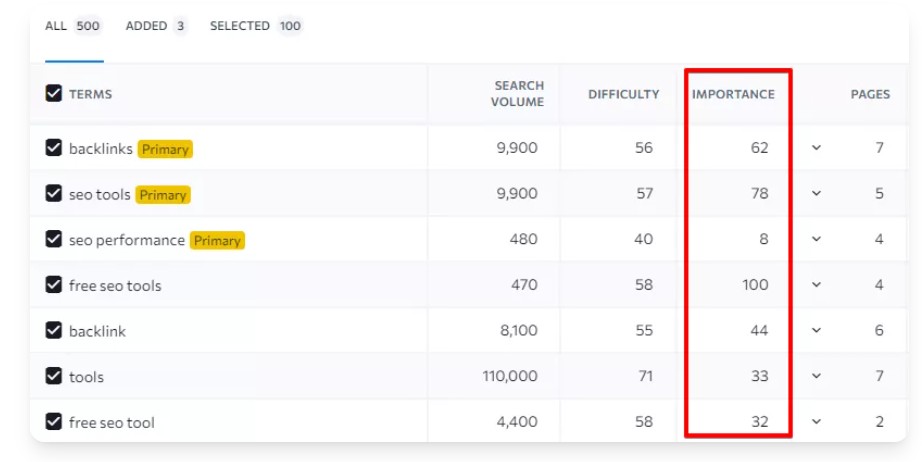
I was impressed with the keyword and term recommendations provided by SE Ranking’s Content Editor. The tool analyzes competitive pages and your draft to suggest relevant keywords and related terms, including NLP-based phrases, to incorporate.
These recommendations are based on SERP and competitor analysis, ensuring that you optimize your content around terms that your target audience is actively searching for.
Furthermore, the feature guides keyword usage and balance so you avoid keyword stuffing while maintaining relevance. This keyword optimization feature enhances content quality and SEO performance. This is a good use of SE Ranking SEO Content Editor to optimize content.
How to use it
After your brief is created, open the keywords/Improvements tab in the editor, review suggested terms, and gradually work them into headings and body copy while watching your Content Score improve.
Where this helps
This is ideal when you want to refresh underperforming pages, expand topical coverage, or make sure writers include all must-have terms without over-optimizing.
Downside
Writers may fixate on “turning terms green” instead of writing naturally, which can hurt tone and readability if not managed well. Some reviewers also note that term suggestions and scoring still need manual judgment, so you can’t rely on them as a perfect ranking guide
Outline Builder Based on Competitor Structure
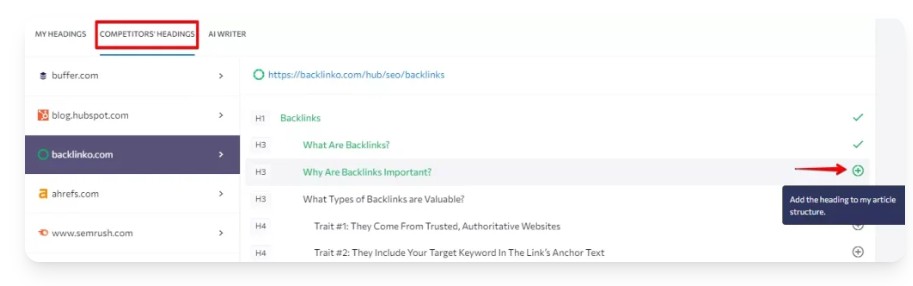
One of the standout features I enjoyed within SE Ranking SEO Content Editor is the outline builder, which leverages competitor structure. This functionality analyzes the outlines of top-ranking pages for your target keywords and suggests a structure for your content.
By examining the headings and subheadings used by your competitors, you can gain insights into the topics and subtopics that search engines deem relevant.
This outline builder not only saves time but also ensures that your content is comprehensive and well-organized, improving its overall SEO performance. Benefit from SE Ranking when creating content.
How to use it
In the Content Editor, go to the Outline tab, review competitor H1–H6 structures, and adapt or apply a suggested outline as the framework for your own headings and subheadings.
Where this helps
This is powerful when briefing writers, building long-form guides, or entering competitive SERPs where matching topical depth and structure is critical.
Downside
Because the outline is based on what competitors already cover, it may miss emerging angles, unique formats, or search intent nuances. If everyone follows similar outlines, pages in the SERP can start to look interchangeable.
Content Score + Brief Progress
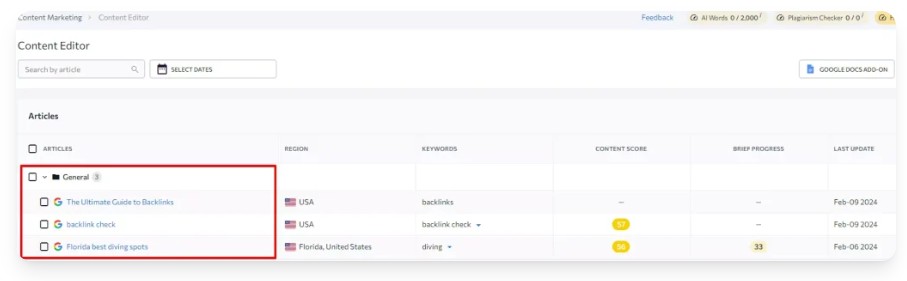
The Content Score and Brief Progress features offer a clear, real-time view of your content’s optimization level within SE Ranking.
As you create and edit your content, the Content Score provides a numerical rating of its SEO effectiveness based on factors like word count, structure, media, and keyword usage.
The Brief Progress indicator visually tracks your progress against the recommendations outlined in your content brief, ensuring you stay on track.
These features help in SEO management and offer actionable insights to improve your content’s ranking potential.
How to use it
While writing, watch the Content Score and brief completion bars in the Improvements tab and tweak headings, length, media, and keywords until they move into the recommended zone.
Where this helps
This is great for agencies and in-house teams who need a quick, shared benchmark of “how optimized” a draft is before sending it for client or stakeholder approval.
Downside
Like most score-based optimizers, the Content Score can encourage “writing for the tool” rather than for users if treated as the ultimate goal. A high score doesn’t guarantee rankings, and you still need human editing, E‑E‑A‑T, and link support to win competitive queries
Readability, Grammar, and Plagiarism Checks
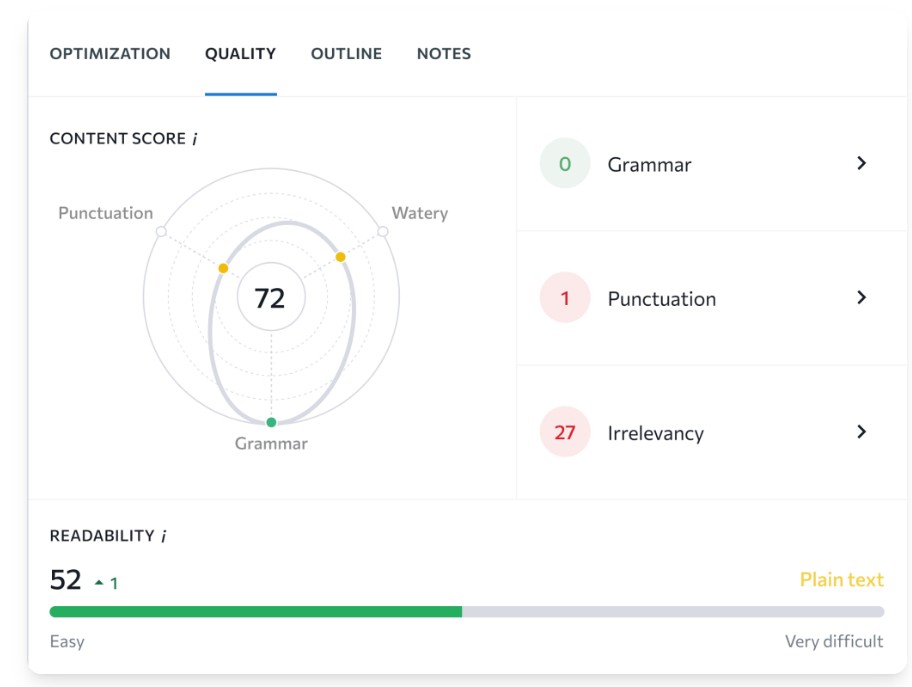
The built-in readability, grammar, and plagiarism checks within SE Ranking SEO Content Editor streamline the content optimization process.
These checks analyze your content for clarity, grammatical accuracy, and originality, ensuring that it meets quality standards.
The readability check assesses how easily your content can be understood by your target audience, while the grammar and plagiarism tools highlight errors and non-unique fragments that may require editing.
The plagiarism check verifies that your content is unique and original, protecting you from potential copyright issues. This tool saves time.
How to use it
Open the Quality tab in the editor to review readability, grammar, and plagiarism results, then apply suggested fixes directly inside the same writing environment.
Where this helps
This is especially helpful for content teams producing at scale, where you need fast checks on originality and clarity without juggling multiple separate tools.
Downside
These checks act as guardrails but won’t fix weak arguments, shallow research, or missing expertise. You may still need specialized tools or editors for advanced style control, detailed grammar, or legal-grade plagiarism checks.
Google Docs Integration
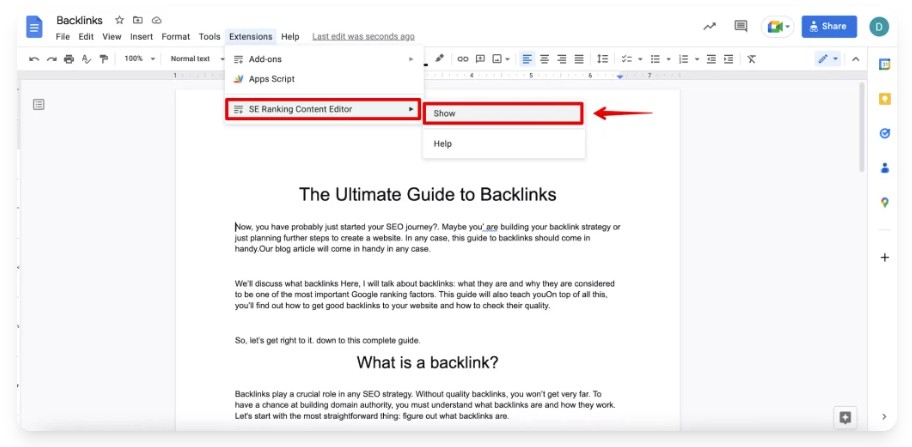
The Google Docs integration within SE Ranking’s Content Editor enhances collaboration and workflow efficiency. This integration allows you to work in Google Docs while still seeing SE Ranking’s optimization guidance via the official add-on.
You can optimize your content within SE Ranking and then easily transfer it to Google Docs for further editing, review, and sharing, or start in Docs and keep SEO recommendations visible as you write.
This integration simplifies the content creation process and promotes seamless collaboration. This promotes efficient SEO management.
How to use it
Install the SE Ranking SEO Content Editor add-on from Google Workspace Marketplace, open your doc, then go to Extensions → SE Ranking SEO Content Editor to pull in your brief and optimization panel.
Where this helps
This shines when your writers, editors, or clients live in Google Docs, but you still want all SE Ranking scoring, keywords, and checks in their existing workflow.
Downside
The integration depends on the Google Docs add-on, which can add setup steps and occasional syncing quirks between Docs and the Content Editor. Some teams may find it less seamless than using a native, all-in-one content platform with built-in multi-user workflows
AI Writer and AI Writer Wizard
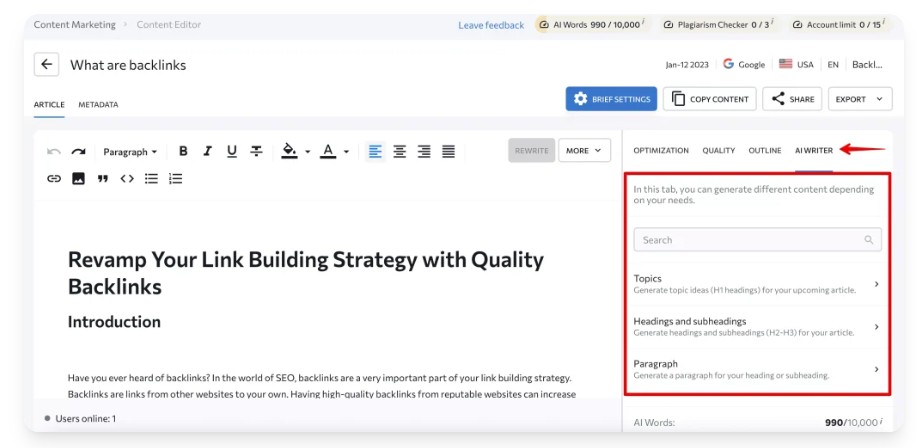
SE Ranking SEO Content Editor also provides access to AI writing tools that leverage artificial intelligence to assist in content creation. These tools can help you generate content ideas, outlines, and paragraphs, and even create long-form drafts based on your target keywords and topics.
The AI-powered workflows guide you through the content creation process, providing suggestions and prompts to help you craft high-quality, SEO-friendly content faster.
While AI-generated content should always be reviewed and edited for accuracy and relevance, these features can save time.
How to use it
Within the SE Ranking SEO Content Editor, open the AI Writer tab or use AI buttons from your brief to generate structures or text for chosen sections, then refine the draft manually to match your voice and intent.
Where this helps
This is most helpful when you’re facing writer’s block, need first drafts or variations quickly, or want to scale outline and paragraph creation for large content roadmaps.
Downside
AI drafts still need heavy editing for accuracy, originality, and brand voice, similar to other AI tools. There are also AI word limits tied to your plan, so it’s not a replacement for dedicated unlimited AI writing platforms if you need massive volume.
Publishing and Performance Feedback Loop
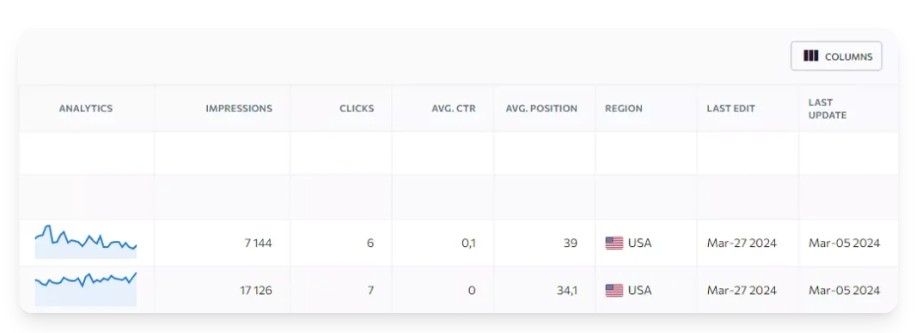
SE Ranking SEO Content Editor offers a robust publishing and performance feedback loop, allowing you to track the effectiveness of your content after it’s published.
By connecting Google Analytics and Google Search Console, you can see metrics such as impressions, clicks, rankings, and organic traffic for your URLs.
By monitoring these metrics, you can identify what’s working well and areas for improvement, enabling you to refine your content strategy and optimize your content for better search engine performance.
This feedback loop helps improve future content. This makes SE Ranking SEO a valuable tool for any SEO professional.
How to use it
Add your site as a project, connect GA and GSC, tie URLs to content tasks, and then use SE Ranking’s analytics and rankings reports to decide which articles to update or expand.
Where this helps
This is crucial for ongoing content programs where you need a closed loop from brief → draft → optimization → performance data to continually improve your library.
Downside
Insights depend on how well you connect GA/GSC and which plan limits you have, so advanced teams may still rely on separate analytics and BI setups.
Some users also mention that SE Ranking’s data updates and reporting depth can feel lighter than more specialized analytics or enterprise SEO suites.
Pros and Cons of SE Ranking SEO Content Editor
Here are the Pros and Cons
Pros of SE Ranking SEO Content Editor
- SERP-driven briefs give clear requirements: Builds briefs from live SERP data with recommended word count, headings, and keywords, so writers aren’t guessing what “optimized” content looks like.
- Smooth brief → write → optimize workflow: Content Score, Brief Progress, and improvement hints create a clear loop: follow the brief, write, and then tweak until you hit the recommended range.
- Built-in quality checks reduce tool switching: Readability, grammar, and plagiarism checks live inside the editor, so teams don’t need separate tools for basic quality control.
- Strong Google Docs integration for writers: Official add-on lets you pull briefs and optimization panels into Google Docs, which reviewers call a major adoption win for content teams already working there.
- Keyword and NLP term suggestions are practical: SE Ranking SEO Content Editor suggests primary and related terms (including NLP-style phrases) pulled from top-ranking pages, helping you cover topical gaps more systematically.
- AI Writer speeds up outlines and first drafts: AI workflows can generate outlines, sections, FAQs, and drafts based on the brief, which can significantly speed up the initial writing phase.
- Integrated with the rest of SE Ranking: Because it’s part of the wider platform, you can connect briefs and drafts to rank tracking, GSC data, and site audits for a full content performance loop.
Cons of SE Ranking SEO Content Editor
- Can encourage “checklist content”: Content Score and term checklists can push teams to write for the score instead of users, leading to rigid or formulaic articles if used without editorial judgment.
- Briefs and scores often need manual tweaking: Reviews note that briefs, keyword sets, and scoring can require a lot of human adjustment before they feel right for the topic and brand.
- Surface-level SERP focus, not deep intent modeling: The recommendations are mainly based on competitor averages (length, headings, keyword usage), so they don’t fully capture deeper search intent or semantic nuances.
- AI output still needs heavy editing: AI Writer drafts can be generic or off-brand; reviewers stress they’re useful for speed but not safe as final copy without fact-checking and rewriting.
- Limits tied to content add-on tier: Articles, AI words, and plagiarism checks are capped by your Content Marketing plan, so content-heavy teams may need higher tiers or extra add-ons.
- UI and workflow can feel complex at first: Some users say SE Ranking SEO Content Editor and its scoring/menus add complexity versus simpler, dedicated content tools, especially for beginners.
- Language support is not fully global: Official docs note full support (incl. NLP) only for certain languages, which can limit usefulness in some markets.
Se Ranking SEO Content Editor Pricing
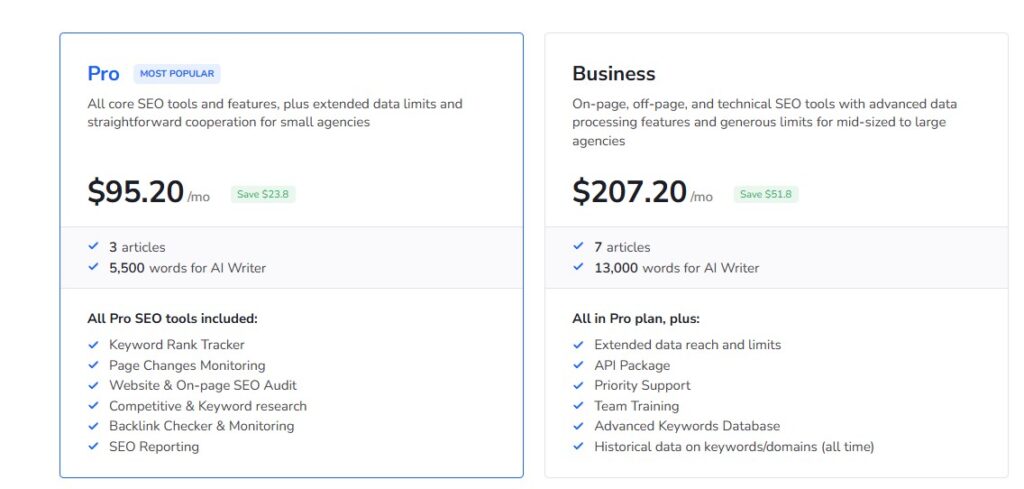
| Plan | Monthly price (billed annually) | Articles included | AI Writer words included | Notes |
|---|---|---|---|---|
| Pro | $95.20/mo | 3 articles | 5,500 words | All core SEO tools + Content Editor with starter limits. |
| Business | $207.20/mo | 7 articles | 13,000 words | Everything in Pro + higher limits, API, training, and more. |
Content Editor add-on packs (extra on top of plan)
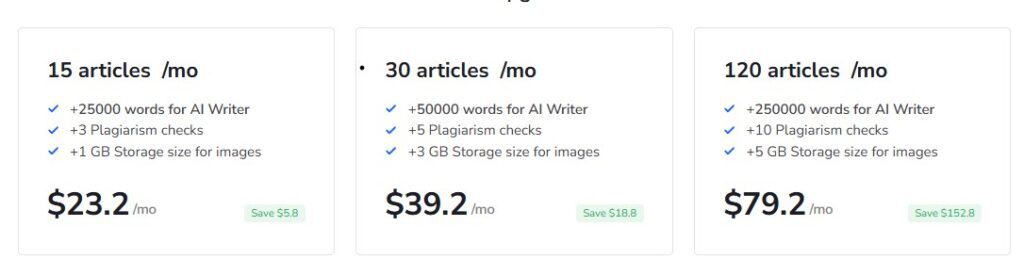
| Add-on pack | Articles per month | Extra AI Writer words | Extra plagiarism checks | Extra image storage | Monthly price (billed annually) |
|---|---|---|---|---|---|
| Add-on – 15 | 15 articles | +25,000 words | +3 checks | +1 GB | $23.20/mo |
| Add-on – 30 | 30 articles | +50,000 words | +5 checks | +3 GB | $39.20/mo |
| Add-on – 120 | 120 articles | +250,000 words | +10 checks | +5 GB | $79.20/mo |
Best Alternative for the SE Ranking SEO Content Editor Tool
When looking for alternatives to the SE Ranking SEO Content Editor, it’s worth comparing tools that offer similar SEO content optimization plus their own strengths.
SE Ranking SEO Content Editor sits inside a full SEO suite with rank tracking, keyword research, and content optimization, but other platforms focus more narrowly on AI and visibility.
One such alternative is Radarkit.ai, which positions itself as an AI/LLM visibility and content insights platform rather than a traditional SEO content editor.
The Radarkit.ai platform analyzes how your brand and content show up across major AI assistants (like ChatGPT, Perplexity, and Gemini) alongside Google SERP data, then provides actionable recommendations to improve both AI citations and search visibility.
This can include content gap insights, topic/entity suggestions, and guidance on what to add so your content is more likely to be cited and surfaced by AI systems.
If you’re seeking a more AI-centric approach to content optimization and visibility, Radarkit.ai emerges as a compelling alternative that leverages AI search analytics rather than just classic on-page scoring.
Radarkit’s Unbeatable Features
Here are Radarkit’s unbeatable features.
Query Fanouts
When you enter the prompt affordable CRM for Startups for tracking in Radarkit.ai, you can see all the other data that an LLM like ChatGPT or Perplexity searches for in the background, aka Fanouts.
You can then utilise this data to craft content that will increase your visibility in LLMs.
GEO Writer
Radarkit’s GEO Writer uses NLP and citation data based on your competitors to create an optimised article with Facts, PAA, and NLP terms that is optimised for both SERP and LLMs.
UI Based Tracking from 50+ Countries
Radarkit used residential IPs from 40+ countries to get real‑time responses from the LLMs based on IP.
FAQs
How does the SE Ranking SEO Content Editor create a brief?
The tool analyzes top-ranking pages for your target keyword and suggests recommended word count, headings, keywords/NLP terms, links, and questions, which you can adjust before writing.
Can I use SE Ranking SEO Content Editor in Google Docs?
Yes, there’s an official Google Docs add-on that lets you pull in your brief, keyword list, and Content Score panel directly into Docs so writers can optimize without leaving their normal workflow.
Does the SE Ranking SEO Content Editor include AI writing features?
Yes, it includes an AI Writer tab that can generate topics, headings, paragraphs, FAQs, and expanded text based on your brief and SERP data, which you can then edit and refine.
How is content quality measured in the SE Ranking SEO Content Editor?
Content quality is measured via a Content Score and Brief Progress metrics that factor in word count, headings, keyword usage, structure, media, readability, grammar, and uniqueness (plagiarism).
Final Thoughts on SE Ranking SEO Content Editor
SE Ranking is a well-rounded, all‑in‑one SEO platform that combines rank tracking, keyword research, site audits, competitor research, AI Writer, and a SERP‑driven SE Ranking SEO Content Editor at a competitive price point.
It’s a strong fit if you want most of your SEO and content workflow in one place and are happy to pair it with a more AI‑visibility‑focused tool like Radarkit for tracking how often your brand appears inside major AI assistants and LLM answers