
This WriterZen Content Creator Tool review dives into the features of WriterZen, examining how it empowers content creators to speed up the content creation process, optimize the content, and ultimately achieve better rankings in search engines.
Whether you’re a seasoned marketer or just starting your journey in content marketing, understanding how to use WriterZen can significantly impact your content strategy.
So, without any further ado, let’s get started.
What is the WriterZen Content Creator Tool?
WriterZen is an AI‑powered SEO content workflow platform built specifically for content creators, marketers, and SEO teams.
It combines keyword research, topic discovery, and content planning into a single, integrated workspace where creators can outline, brief, and write high‑ranking content in one place.
The tool starts with SERP‑driven research; it pulls insights from Google’s top 20 results (including NLP signals like entities and intent) to help you build a strong, competitive outline quickly.
From there, you can use WriterZen’s AI Assistant inside the editor to expand sections, rewrite, or generate content.
All while staying in the context of your outline and target keywords.
Who Need WriterZen Content Creator Tool
WriterZen is ideally suited for a wide range of users involved in content creation and SEO-focused digital marketing.
The following groups benefit the most from its workflow-centered toolset.
Freelance Content Creators
Freelancers, bloggers, and independent writers can use WriterZen to manage multiple projects, research keywords, and build SEO-optimized outlines and drafts in one place.
This helps them deliver higher-ranking content more efficiently for different clients or niches.
Marketing Agencies and Teams
Marketing agencies and in-house content teams can streamline their entire content workflow, from research and briefs to drafting and optimization, inside WriterZen’s centralized hub.
Shared projects, structured briefs, and AI-assisted drafting support scaling content production while maintaining consistent SEO standards.
SEO Specialists and Strategists
SEO professionals benefit from WriterZen’s advanced keyword research, topic discovery, clustering, and SERP-driven content insights.
These features make it easier to design data-backed content strategies and optimize on-page content around proven search intent and competitive gaps.
Small Business Owners and Entrepreneurs
Small and medium-sized business owners, solopreneurs, and individual marketers can use WriterZen as an intuitive all-in-one platform to plan and create content that ranks without juggling multiple tools.
Its guided workflow and AI assistance lower the barrier for non-technical users to produce search-friendly content.
Overall, WriterZen is a strong fit for anyone who wants to create high-quality, SEO-optimized content based on real search data rather than guesswork.
Content creators, digital marketers, and SEO enthusiasts who prioritize structured workflows and search intent will get the most value from the platform.
WriterZen Content Creator Tool Features Breakdown
Here are the features of the WriterZen Content Creator Tool.
Research Features and SERP analysis
When working inside the WriterZen Content Creator Tool, the research phase feels less like staring at a blank screen and more like being handed a condensed SERP intelligence report for your target keyword.
WriterZen pulls data from the top 20 ranking pages, surfaces outlines, headings, and key talking points, so you instantly see what Google is currently rewarding instead of guessing in the dark.
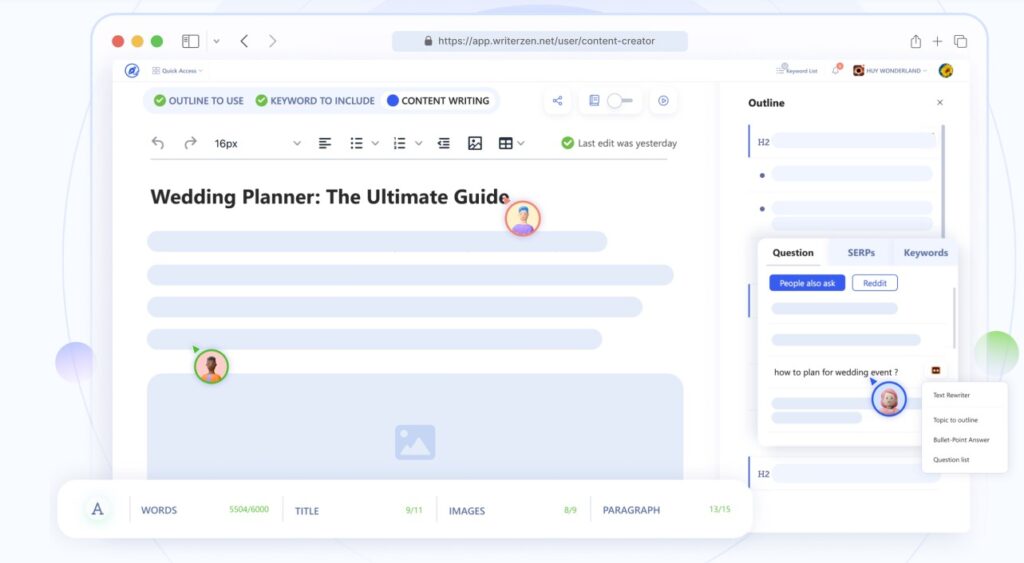
In practice, this means that before writing a single line, you already know the dominant angles, content depth, and gaps you can fill, which makes planning and differentiation much easier than juggling a dozen open tabs.
What stands out is how everything sits in one workspace: SERP overview, competitor summaries, and keyword suggestions are all accessible as you build your article, rather than in separate tools or spreadsheets.
The experience is that the WriterZen Content Creator Tool quietly does the heavy lifting of competitor research in the background, leaving you free to focus on strategy and positioning instead of raw data collection.
Briefing and Outline creation
The briefing and outline stage inside WriterZen feels like moving from a messy notebook to a structured content blueprint.
Once you pick a keyword, the tool suggests related queries, opportunity keywords, and user-intent phrases directly pulled from Google’s ecosystem, so your brief is grounded in what real users are searching for.
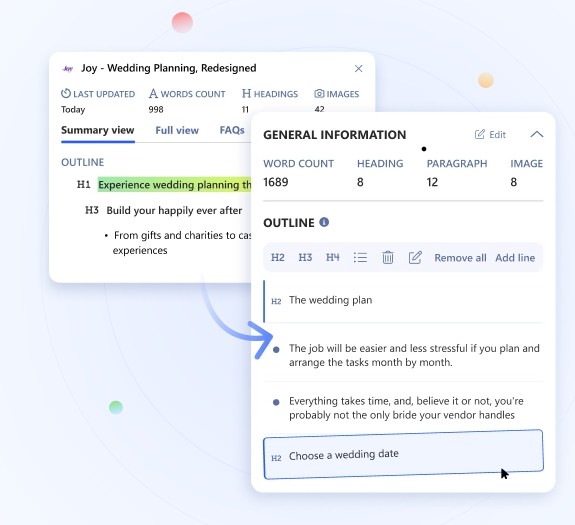
You can drag headings from competitor pages, add FAQs, and stitch together a comprehensive outline that mirrors top performers while still leaving room for your own angle.
In day-to-day use, this briefing flow cuts down a huge chunk of prep time: instead of manually scanning articles and copy‑pasting headings, you build the skeleton of your piece in a single tab and push it straight into the writing phase.
The result is that every draft starts with a clear structure, target keywords, and intent baked in, which is exactly what makes the WriterZen Content Creator Tool feel like a proper workflow product rather than “just another AI writer.”
The Editor and Optimization Guidance
WriterZen’s editor is clearly designed to keep you in the writing flow while still nudging you toward SEO best practices.
While you draft, you can pull in relevant search queries, rephrase insights from top-ranking articles, and respond to user-intent questions from sources like Google and Reddit without leaving the editor.
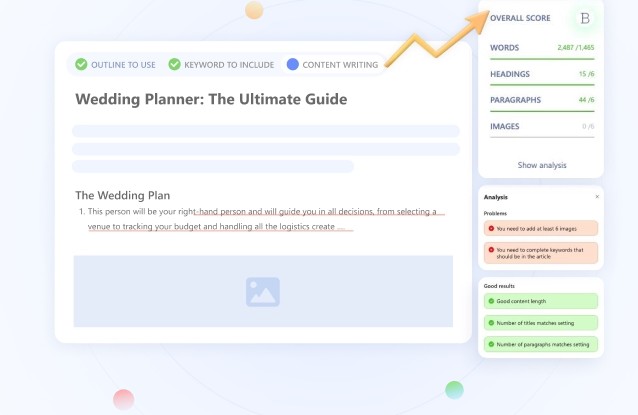
Once a draft is in place, the optimization layer compares your content against the top SERP results and gives a score, along with suggestions around coverage, readability, and competitive gaps.
The experience here is similar to having a quiet coach over your shoulder: the tool highlights where you may be under‑serving a topic or missing entities/sections that are common among winners, but it doesn’t force you into a rigid template.
Used well, this makes the WriterZen Content Creator Tool a way to validate that your article is truly competitive before you hit publish, instead of discovering weaknesses only after the content underperforms.
Google NLP Integration
Google NLP is where the “under the hood” magic of WriterZen starts to show. WriterZen uses Google’s NLP API to scan the top 20 pages for your keyword and analyze entities, salience, and entity-level sentiment, essentially building a semantic map of what Google associates with that topic.
When you turn on Google NLP in a project, you see extra columns and signals inside the outline and research steps that highlight important entities and concepts you should consider covering.
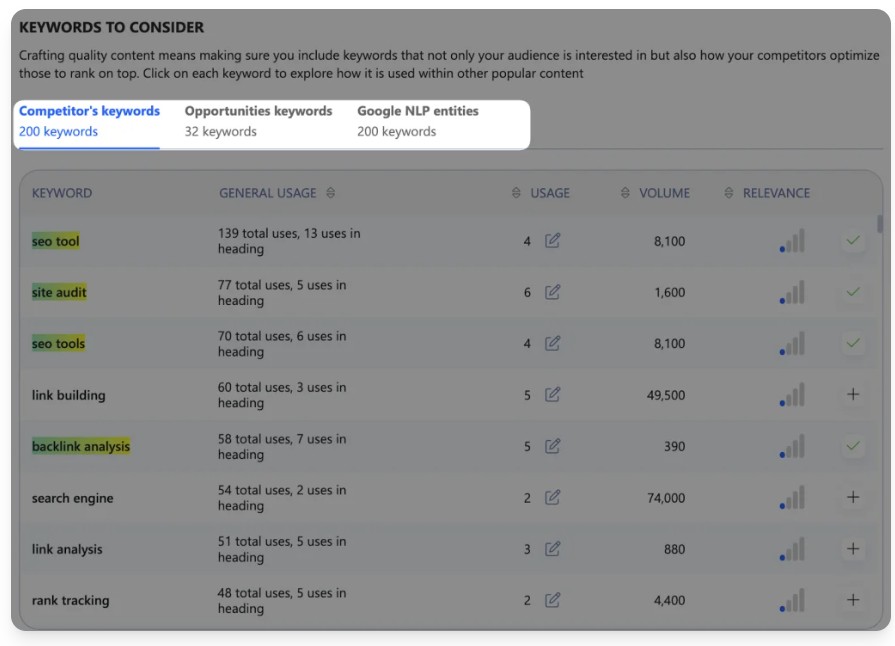
From a user’s standpoint, this goes beyond classic keyword stuffing and moves you toward writing content that aligns with how Google actually understands topics.

Instead of guessing which concepts matter, you get data-driven cues about entities and relationships, so your outline and final draft can better match Google’s knowledge graph expectations.
This is a big part of why the WriterZen Content Creator Tool feels built for modern semantic SEO rather than old-school keyword density.
AI Writing Assistant
The AI Writing Assistant in WriterZen sits inside your existing brief and outline, which makes it feel like a natural extension of your workflow rather than a separate “magic button.”
You can use it to expand sections, rewrite paragraphs, generate intros, conclusions, or subhead explanations, always in the context of the structure and keywords you’ve already defined.
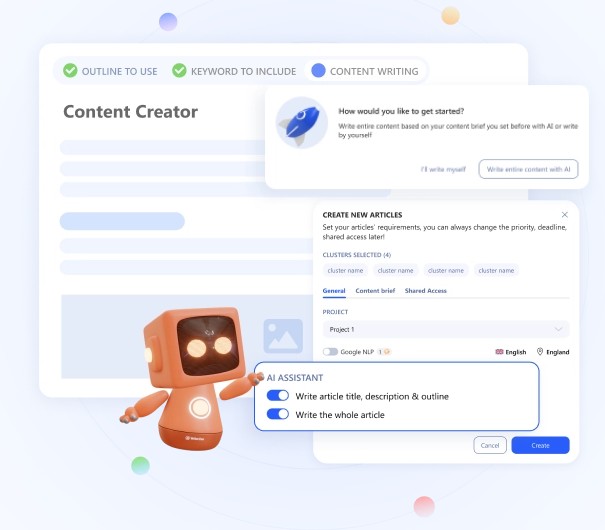
Because it lives in the same editor that houses your SERP research and brief, the AI tends to stay closer to the topic and intent you’re targeting.
In everyday use, the assistant shines when you have a solid outline but hit a wall on phrasing or flow. It helps you get from skeletal headings to a readable first draft much faster, while you still retain control over tone, examples, and depth through manual edits.
Used this way, the WriterZen Content Creator Tool feels like a collaborative co‑writer that speeds you up rather than a generator you have to fix from scratch.
Plagiarism Checker
The plagiarism checker is tightly integrated into the WriterZen editor, so checking originality becomes a one-click part of the same workflow instead of a separate chore.
WriterZen states that it scans your drafts against billions of pages in Google’s index and returns a detailed report that highlights potential duplicates and overlaps.
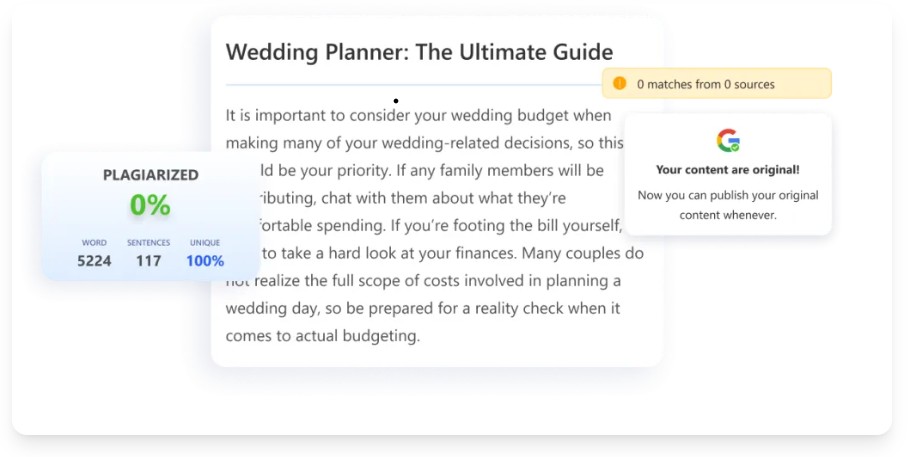
You can also import content, exclude specific domains, and work with fairly generous limits (up to 12,000-word drafts and large daily word allowances), which is practical for agencies and high-volume publishers.
In practice, this makes it easy to run an originality pass right before final approval, especially when you combine AI-assisted drafting with human editing.
The benefit is peace of mind: the WriterZen Content Creator Tool lets you move from research to writing to plagiarism checking without tool switching, which reduces friction and keeps your focus on improving the content rather than managing software.
Team function
The team function inside the WriterZen Content Creator Tool turns what is usually a messy mix of docs, chats, and sheets into a single shared workspace for everyone involved in content production.
You can invite team members and guests (like freelance writers), assign them seats, and give them access to shared projects and articles so everyone is working from the same dashboard.
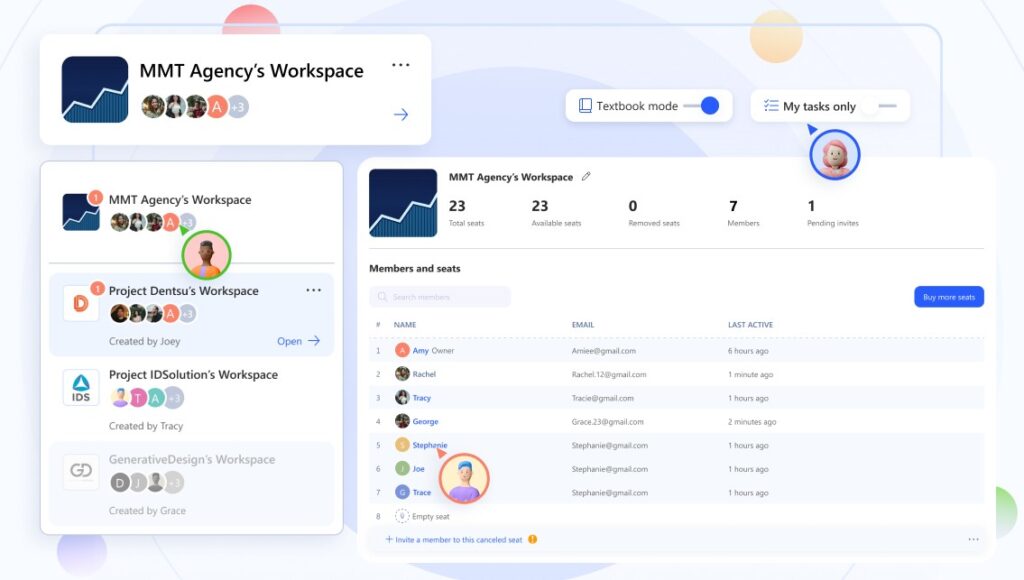
In practice, this means your strategist, writer, and editor can all see the same project list, tasks, and article statuses without constantly updating separate PM tools or chasing status updates in DMs.
What feels especially useful is how tightly collaboration is tied to the actual content workflow: you can assign tasks at the project or article level, track status from writing to review to approval, and use comments directly in the collaborative editor to give feedback in context.
Real-time activity notifications, member activity status, and shared usage limits make it clear who owns what and how the workspace is being used, so scaling a content team becomes more about refining process than wrestling with tools.
WriterZen Content Creator Tool Pricing
| Plan name | One-time price (lifetime) | Positioning / best for | Key inclusions (from pricing page) |
|---|---|---|---|
| Keyword Research | $75 one-time | Made for keyword masters | 30,000 keyword credits, 10,000 keywords clustering, 50 keyword lists, Keyword Explorer (50 lookups), Keyword Golden Filter, Revenue forecast, Topic Discovery, Content Creator, Plagiarism Checker, Team Collaboration. |
| All-In-One Basic | $150 one-time | Made for full-stack SEO specialists | 30,000 keyword credits, 10,000 keywords clustering, 50 keyword lists, Content Creator (50 articles/month), Unlimited AI writing, Plagiarism Checker (unlimited words), Keyword Explorer (50 lookups), Keyword Golden Filter, Revenue forecast, Unlimited Topic Discovery, Team Collaboration. |
| All-In-One Advanced | $225 one-time | Made for small SEO teams | 50,000 keyword credits, 10,000 keywords clustering, 100 keyword lists, Content Creator (100 articles/month), Unlimited AI writing, Plagiarism Checker (unlimited words), Keyword Explorer (100 lookups), Keyword Golden Filter, Unlimited Topic Discovery, Team Collaboration + 2 extra member seats |
WriterZen Content Creator Tool: Pros & Cons
WriterZen Content Creator is generally strong as an SEO-focused workflow tool, with most drawbacks around AI quality, speed, and learning curve rather than core functionality
Pros
- End-to-end SEO workflow in one place: WriterZen connects keyword research, topic discovery, content briefs, AI-assisted drafting, optimization, plagiarism checks, and team collaboration in a single platform, so you are not juggling multiple tools to ship one article.
- Excellent for research, outlines, and SERP-driven strategy: The Content Creator builds outlines from the top 10–20 ranking pages, surfaces headings, FAQs, and keyword ideas, and helps you structure articles around proven SERP patterns and search intent.
- Clear SEO optimization guidance: WriterZen provides NLP-driven term suggestions, topic coverage cues, and a content strength view that compares your draft to current winners, which is helpful for ensuring you are not missing critical subtopics or entities.
- Time-saving for content teams and agencies: Agencies and SEO teams highlight that having briefs, outlines, drafts, and plagiarism checks under one roof reduces context switching and speeds up collaboration across strategists and writers.
- Good value versus stacking multiple SEO + AI tools: Lifetime-style pricing and bundled features (research, AI, plagiarism, team function) often make WriterZen attractive compared to paying for separate keyword tools, optimizers, AI writers, and collaboration platforms
Cons
- AI writing quality still needs heavy editing: Across reviews, a consistent theme is that AI-generated drafts from WriterZen are usable as a starting point but not as final content: they often require substantial editing to improve style, depth, and brand voice.
- Learning curve and interface friction: Since the platform exposes a large amount of data (filters, SERP views, clustering, and NLP terms), newer or non-SEO users may feel overwhelmed at first and require time and training to use it effectively.
- Slowness and limits in certain tasks: Some users report that keyword tools and content generation can be slow at times or occasionally return limited data compared to large players, which can be frustrating when working on many pieces at once.
- AI optimizer and NLP less advanced than niche competitors: The NLP and on-page optimization suggestions are helpful but are described as less sophisticated than dedicated optimizers like SurferSEO or NeuronWriter, acting more as a guide than a strict, score-based system.
- Team and plagiarism tools are not best-in-class on their own: Integrated plagiarism checking is convenient inside the WriterZen Content Creator Tool, but some reviewers note it is not as accurate as specialist plagiarism solutions and should not be your only gate for high-stakes content. Similarly, while team function and collaboration are beneficial, solo users may not see much added value, and advanced teams might still prefer dedicated project management or editorial calendar tools in addition to WriterZen.
A Strong Writezen Content Creation Tool Alternative
Radarkit.ai is a strong alternative to Writezen Content Creation Tool for agencies that want to move beyond traditional SEO content tools and focus on how their brand actually performs inside AI search and LLM answers.
Radarkit tracks and analyzes visibility across models like ChatGPT, Gemini, Perplexity, Copilot, and AI Overviews, showing which pages get cited, how often brands are mentioned, and where competitors are winning.
On top of that, its AI-assisted content generation helps teams create or refine pages specifically tailored to earn more AI citations and entity mentions, closing the loop between insight and execution.
With AI Visibility Scores, Share of Voice dashboards, Brand Reputation metrics, and GA4 integration to tie everything back to traffic and outcomes, Radarkit.ai becomes a compelling WriterZen alternative for agencies that already have production workflows in place but now want to engineer content for the AI era.
Radarkit’s Unbeatable Features
Here are Radarkit’s unbeatable features.
Query Fanouts
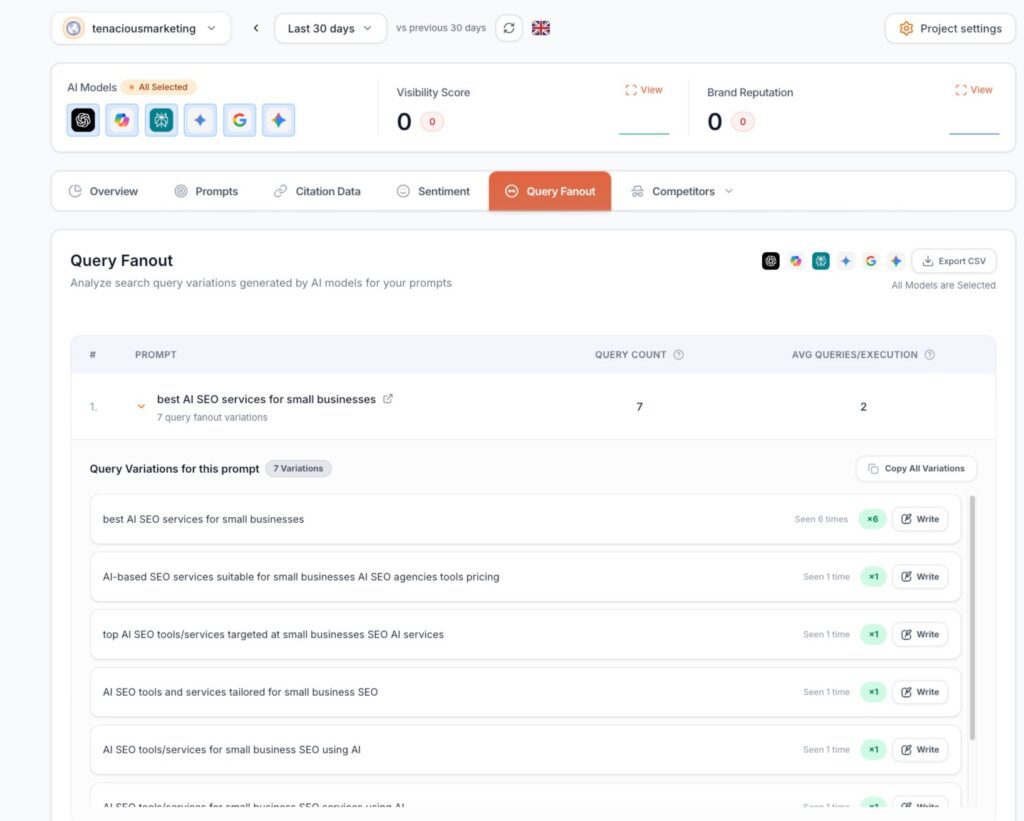
When you enter the prompt affordable CRM for Startups for tracking in Radarkit.ai, you can see all the other data that an LLM like ChatGPT or Perplexity searches for in the background aka Fanouts.
You can then utilise this data to craft content that will increase your visibility in LLMs.
GEO Writer

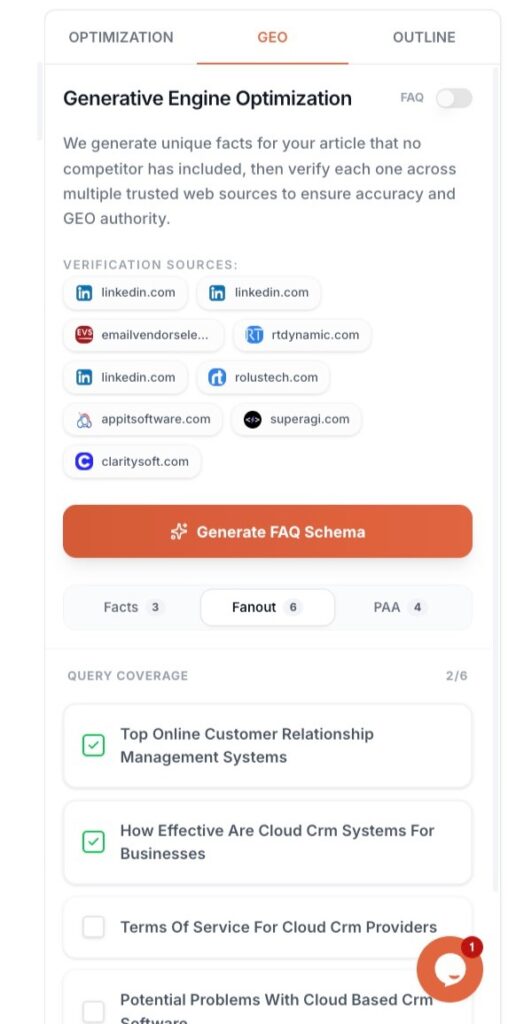
Radarkit’s GEO Writer uses NLP and citation data based on your competitors to create an optimised article with Facts, PAA, and NLP terms that is optimised for both SERP and LLMs.
UI Based Tracking from 50+ Countries
Radarkit used residential IPs from 40+ countries to get real‑time responses from the LLMs based on IP.
FAQs about WriterZen Content Creation Tool
Is WriterZen good for beginners who don’t know much about SEO?
Yes. WriterZen is beginner-friendly, with guided keyword research, topic discovery, and AI-assisted briefs that help non-SEOs structure content around search intent without needing deep technical knowledge.
Can WriterZen replace tools like Ahrefs, Semrush, or Surfer SEO?
WriterZen can cover a lot of use cases around keyword research, topical clustering, and content optimization, but it does not fully replace large suites like Ahrefs or Semrush for backlinks and technical SEO. It is closer to tools like Surfer or Frase for content workflow and on-page optimization.
Does WriterZen use AI to write entire blog posts, and is the content original?
WriterZen’s AI writing assistant helps with outlines, sections, and drafts, but users still need to edit and refine for quality and brand voice. The built-in plagiarism checker helps ensure the final content is original before publishing.
Can multiple team members collaborate inside WriterZen?
Yes. WriterZen offers team and collaboration features that let agencies and in-house teams share projects, manage roles, and work from the same content pipeline instead of juggling separate docs and tools.
Is WriterZen worth it for agencies already using other SEO tools?
For agencies that already use major SEO suites, WriterZen is often added as a dedicated content research and drafting hub, thanks to its keyword clustering, content optimizer, and AI-assisted workflows that speed up production.
It is especially appealing to teams wanting a single workspace for moving from research to brief to draft.
Final thought on WriterZen Content Creation Tool
WriterZen is a solid all-in-one content creation and SEO tool, particularly suited to content creators, marketers, and businesses that want to tighten up their SEO content workflow.
Its core strengths lie in combining keyword research, topic discovery, and an AI writing assistant so users can move from research to brief to draft in a single environment and produce search-focused content more efficiently.
There are still reasonable considerations around pricing tiers and how heavily teams should depend on AI-generated drafts, which typically work best as a starting point rather than a final product.
However, the overall value of WriterZen comes from how it simplifies research and on-page optimization, helping users improve visibility without stitching together multiple tools.
By leveraging features like keyword explorer, topic discovery, content optimizer, and plagiarism checker, users can uncover in-depth keyword opportunities, find relevant topics, and craft original, SEO-friendly content that better aligns with search intent and audience needs.
Ultimately, WriterZen functions as a powerful research-driven content creation and optimization platform that can significantly improve content workflow and support better organic performance when used thoughtfully as part of a broader SEO strategy.