In this SplashDash Review, we’ll explore how SplashDash is redefining local SEO reporting in 2026 as an all‑in‑one dashboard that builds clean, client‑ready reports in seconds, with no integrations or complex setup required.
This guide covers what SplashDash is, who it’s best for, its pros and cons, key features, pricing, top competitors, and whether it deserves a spot in your agency’s local SEO toolkit.
So, without any further ado, let’s get started.
What is SplashDash?
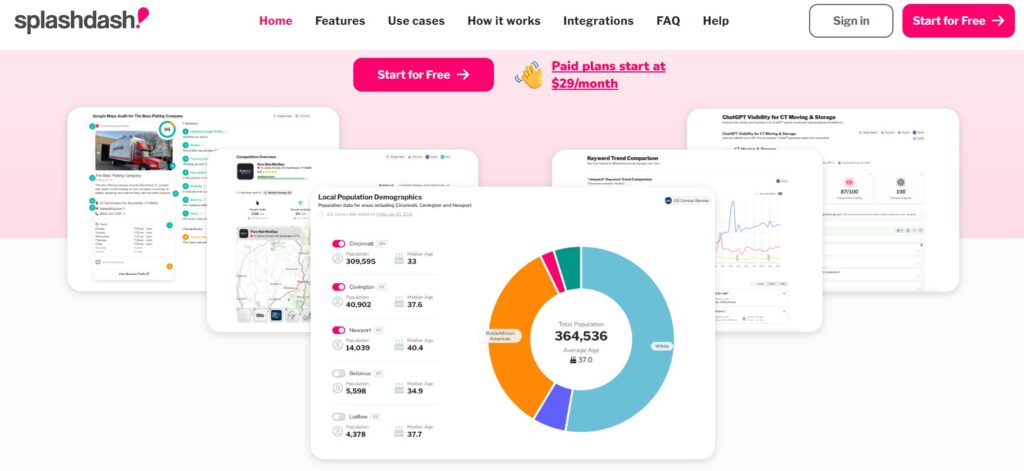
SplashDash is a local SEO reporting platform that generates clear, visual reports you can share with clients instantly. It pulls data from multiple well‑known SEO, ad, and data providers to create one consolidated snapshot of a local market.
Every report includes charts, tables, maps, and plain‑English talking points so you can explain “what this means” and “what to do next” without spending hours preparing slides.
A key strength is ease of use. You don’t have to authenticate a bunch of apps or connect APIs to start. You run a report, SplashDash does the heavy lifting in the background, and you get a polished link you can send straight to prospects or clients.
Reports are read‑only snapshots, so when you need fresh data, you just re‑run the same report instead of managing complex live dashboards.
Who is SplashDash Best For?
SplashDash is clearly built with local agencies and solo marketers in mind, and that’s obvious the moment you start using it.
It’s ideal for freelancers juggling SEO, design, and client updates, agency owners tired of bloated tools and manual reporting, designers who want to add SEO to their offer, and marketers who are constantly explaining rankings to confused clients.
If you’re sending spreadsheets that never get opened or pasting screenshots into Canva or PowerPoint, this tool is probably aimed directly at you.
It’s also a strong fit for small teams that want to look like a bigger agency by sending polished, branded‑feeling reports without hiring analysts.
It’s not an execution tool—it’s about reporting and insights, not campaign management—so it works best alongside tools you already use for implementation.
Right now, it’s focused on U.S. markets, which is important to consider if you serve a lot of international clients.
Pros and Cons SplashDash
No SplashDash review is complete without weighing the pros and cons. Here’s what stands out when you look at it from a practical agency perspective.
Pros
- Fast, one‑click reports: One click triggers all the necessary data sources and returns a finished report you can forward instantly.
- Zero integrations required: You don’t need to connect analytics or ad accounts before running local SEO reports, which lowers the barrier to testing and speeds up onboarding.
- Client‑friendly explanations: Each report includes plain‑language insights and talking points so you’re not stuck translating jargon before every meeting.
- Strong local focus: It shines in competitive overviews, local demographics, reviews, and map visibility, which is especially relevant for local service businesses.
- Generous free plan: 25 basic reports per month means you can test it deeply before upgrading, making it easy to trial without risk.
Cons
- U.S.‑only coverage for now: You’ll be limited to U.S. markets until they expand, which is a real constraint if you have a global client base.
- Reports are static snapshots: There’s no auto‑refresh; to update data you must re‑run a report, which could be a downside for people who love live dashboards.
- Not an execution platform: It won’t replace your SEO or ad tools; it’s more of a reporting and communication layer.
- White‑label still evolving: Full customization (logo, colors, custom domain) is still maturing, depending on when you read this.
SplashDash Review Core Features
SplashDash packs powerful report types tailored for local SEO client pitches and recurring check‑ins. Here’s a quick breakdown of the most important ones.
ChatGPT Visibility
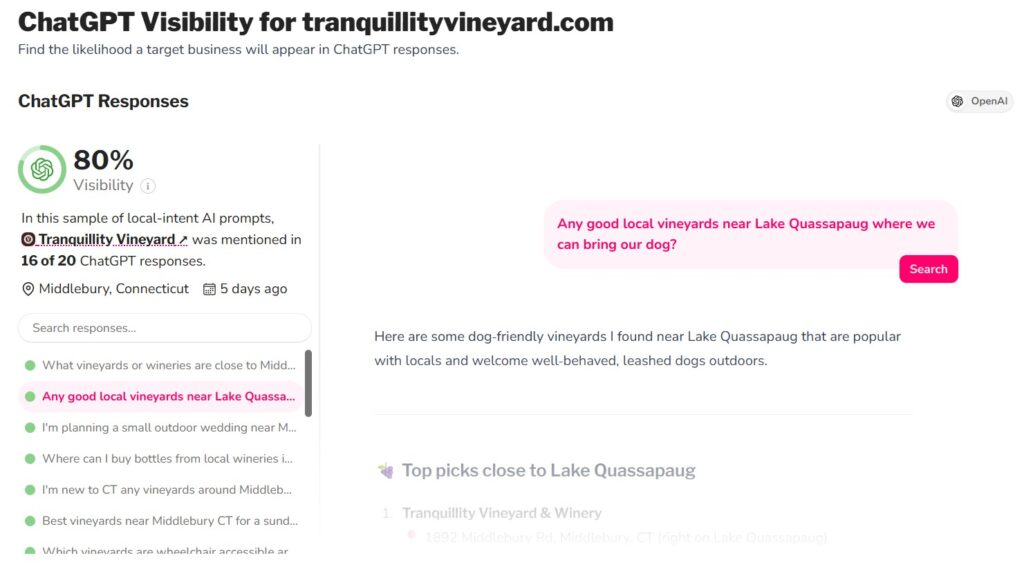
Shows how well a business surfaces in AI‑driven search results and conversational AI experiences. Most tools still think only in terms of classic search engines, so this helps you start talking to clients about how they appear when users ask AI tools for recommendations, not just when they type keywords into a browser.
Digital Presence
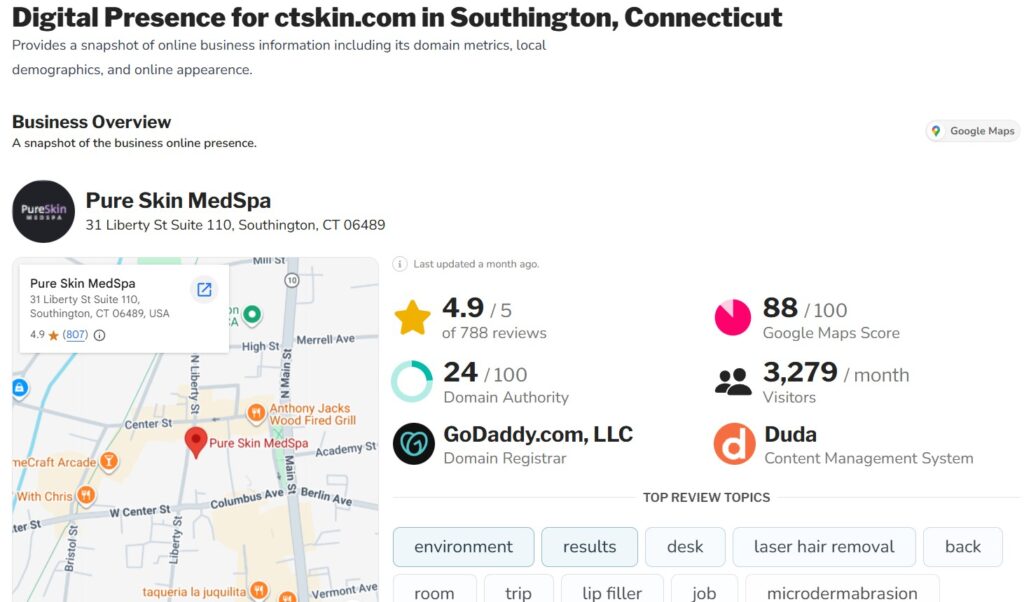
Gives you a complete audit of a business’s local listings, reviews, and general visibility across key platforms. You see where they’re listed, how consistent their info is, whether they’re collecting enough reviews, and where obvious visibility gaps exist, perfect for building a pitch or prioritizing fixes.
Competitive Overview
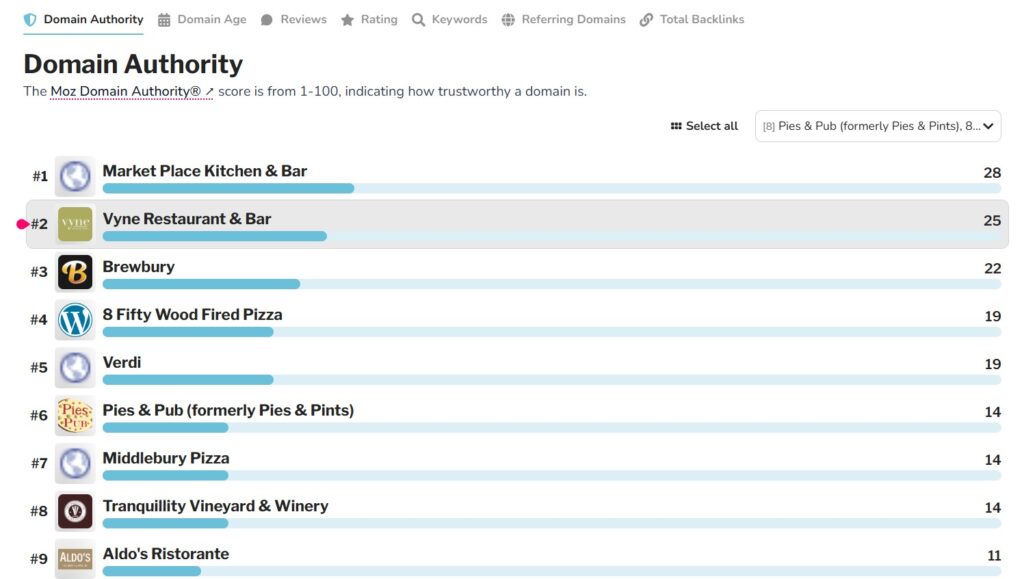
Lays your client side‑by‑side with their top local competitors on traffic, authority, reviews, and other visibility signals. Clients instantly understand whether they’re leading, lagging, or just invisible, which makes it far easier to justify budgets and explain why “doing nothing” is not an option.
Ad Budget Simulator
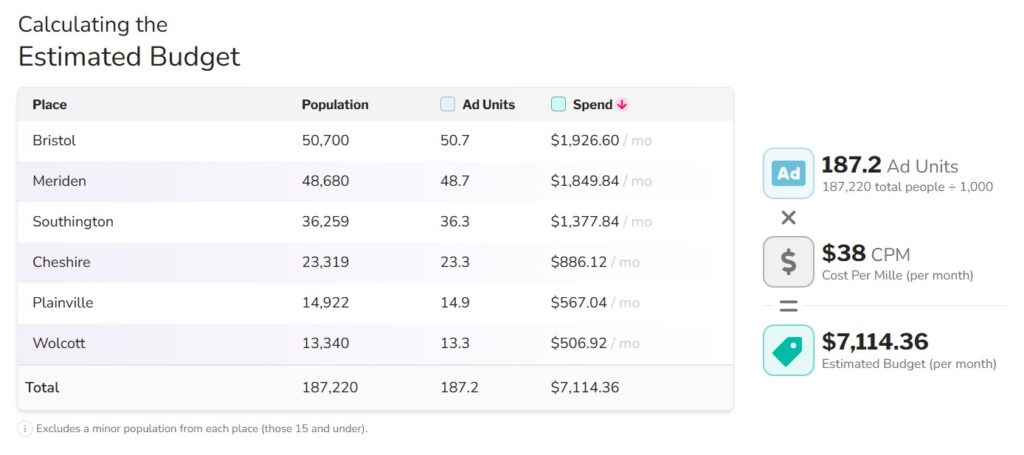
Let’s you plug in a potential Google Ads budget and see estimated clicks, leads, and cost‑per‑acquisition for a specific local market. Instead of guessing when clients ask, “What if I spend X?”, you can generate a visual, data‑driven answer in seconds.
Competitor Ad Strategies
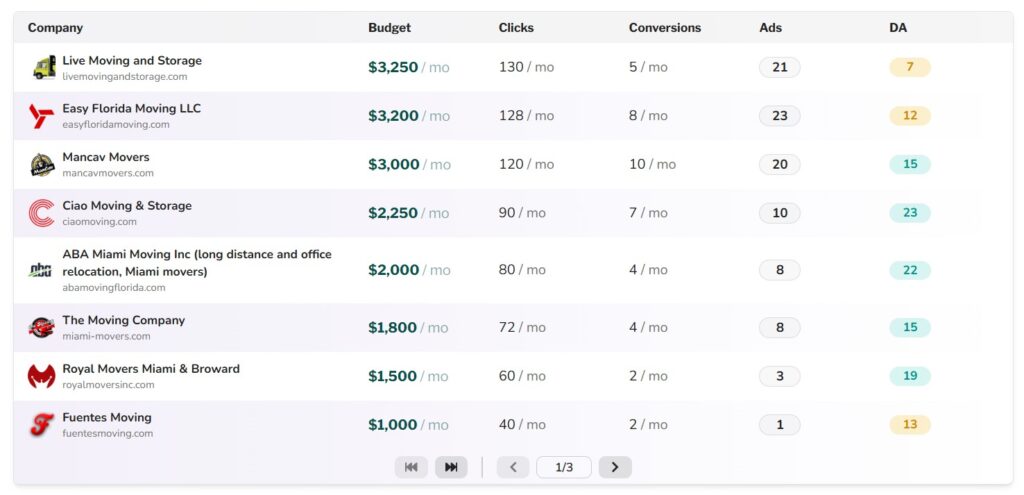
Analyzes what local rivals are likely spending on ads, what kind of keywords they’re going after, and how aggressively they’re playing the game. That gives you a big edge in sales calls: you’re not just saying “you have competition,” you’re showing exactly how that competition behaves in the ad space.
LSA Ranking
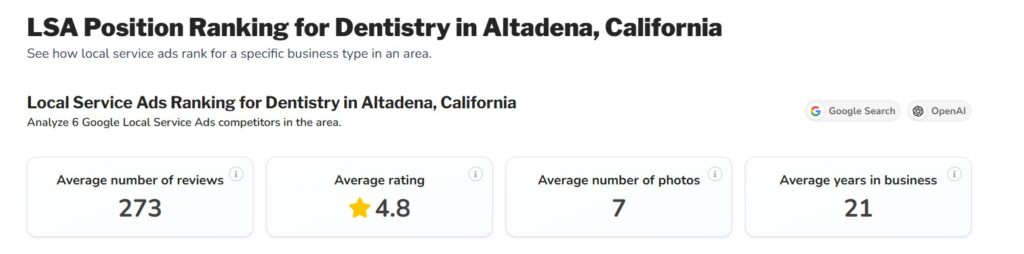
Focuses on Google Local Service Ads and map positions, which are critical surfaces for many local businesses. With this report, you can show how often a business appears, where it ranks, and whether it’s missing out on local visibility opportunities.
Local Backlinks Benchmark
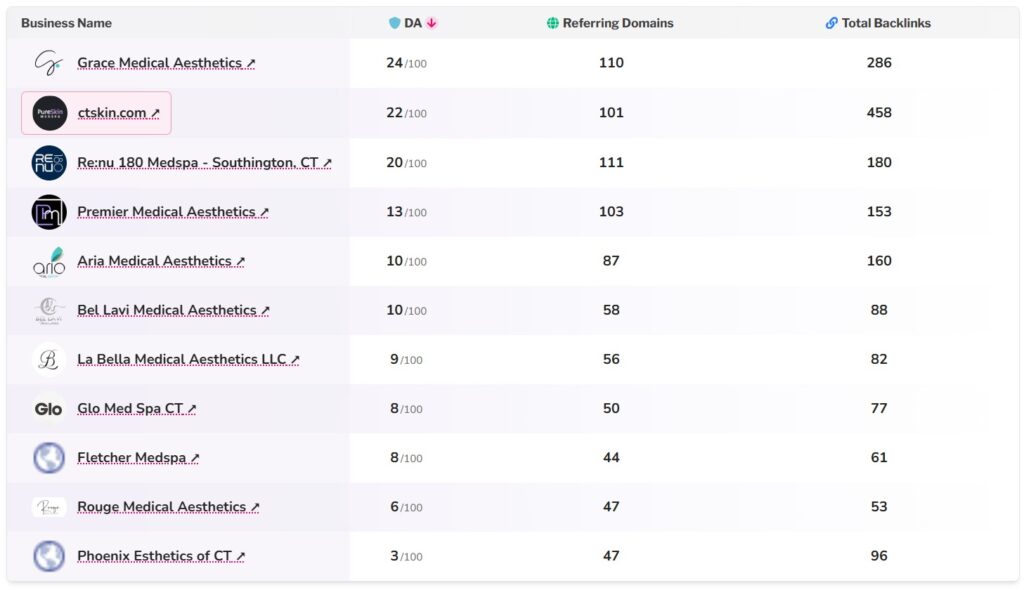
Compares your client’s backlink profile to local competitors so you can see who has the strongest authority in that specific market. That helps set realistic link‑building goals and frame the gap you need to close.
Backlinks Overview
Gives you a deeper dive into who is linking, what anchor text they’re using, and how that profile looks over time. It helps translate complex link data into something presentable for clients while still providing enough detail for strategists.
Domain Rating Over Time
Shows how a site’s authority has grown or declined over months or years. You can point to an upward curve and tie it to your campaigns, or highlight stagnation to argue for more investment.
Marketplace Overview
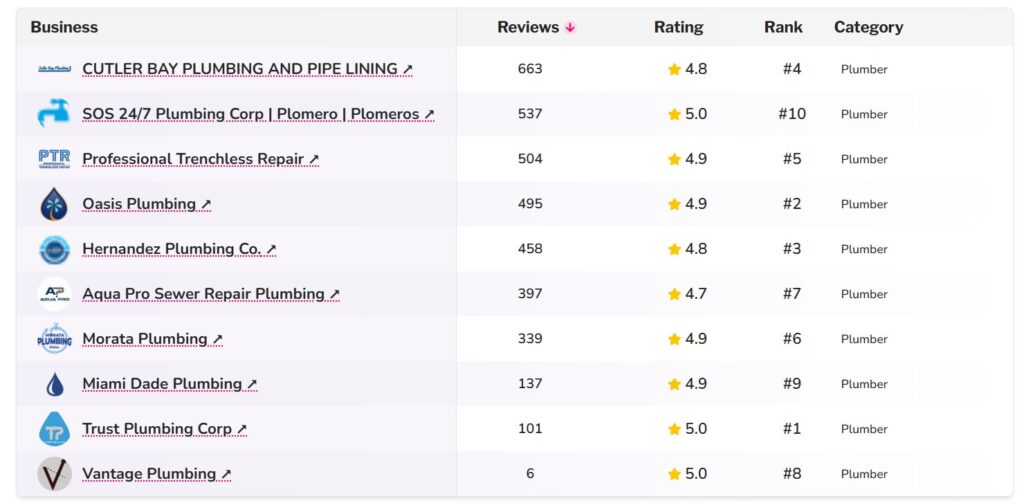
Aggregates review counts, star ratings, and other high‑level metrics across major review platforms. It’s the high‑level slide you show early in a pitch to demonstrate how visible and trusted (or not) a business appears around the web.
Customer Sentiment
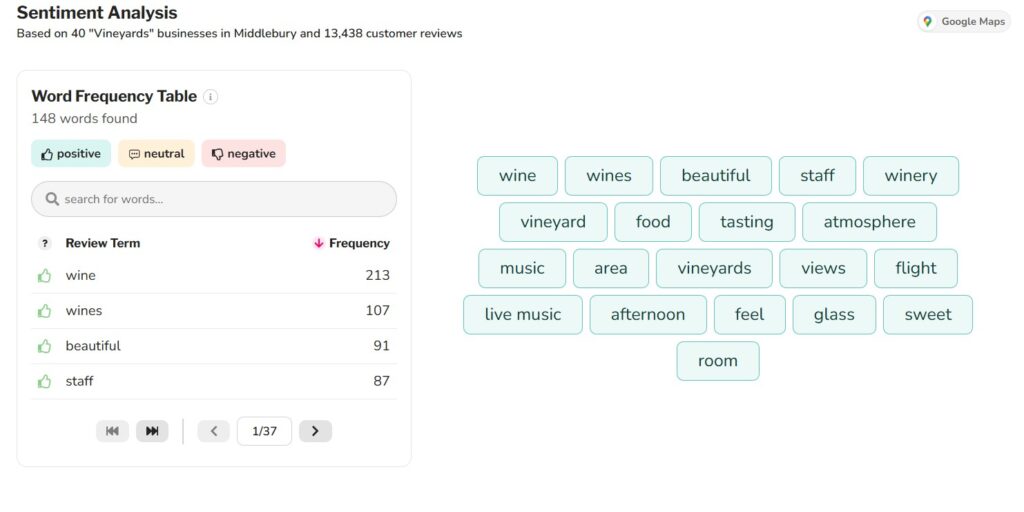
Digs into the language of reviews to identify common themes, what people love, what they hate, and what keeps showing up. This becomes your bridge between SEO and operations, bringing real customer voice into the conversation and turning it into suggestions for service improvements and messaging.
Position Tracking
Handles the basics, which keywords you rank for, where you appear, and how that’s changing over time. The value is in how it’s visualized for non‑SEO folks so you can show progress clearly and connect ranking changes to your work.
Keyword Trend Comparison
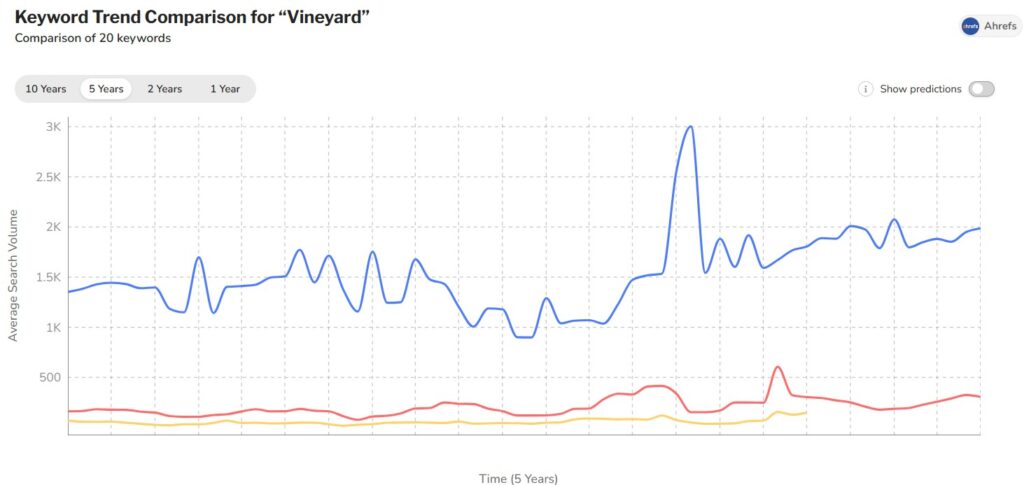
Let’s you see how your rankings and traffic potential compare to competitors for key terms. You can identify where you’re close to overtaking competitors, where you’re lagging badly, and which keywords deserve immediate attention.
Advanced Keyword Research
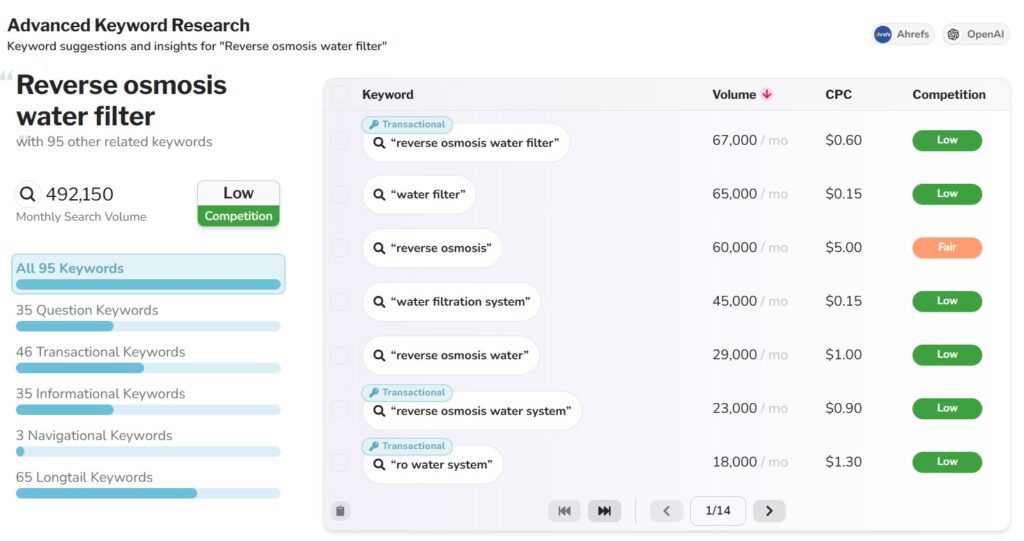
Helps uncover local keywords with good intent signals and reasonable difficulty, so you’re not just guessing content ideas. You get a focused list of terms worth targeting instead of digging through spreadsheets for hours.
Keywords Driving Traffic
Focuses on which search terms actually send visitors, not just which ones you rank for. That lets you distinguish between vanity rankings and business‑driving keywords and align your content work with what truly moves the needle.
Top Website Pages
Reveals which pages attract the most visitors and which keywords drive those visits. This quickly turns into an optimization roadmap: improve copy, internal links, and calls‑to‑action on the pages that already get attention.
Local Demographics
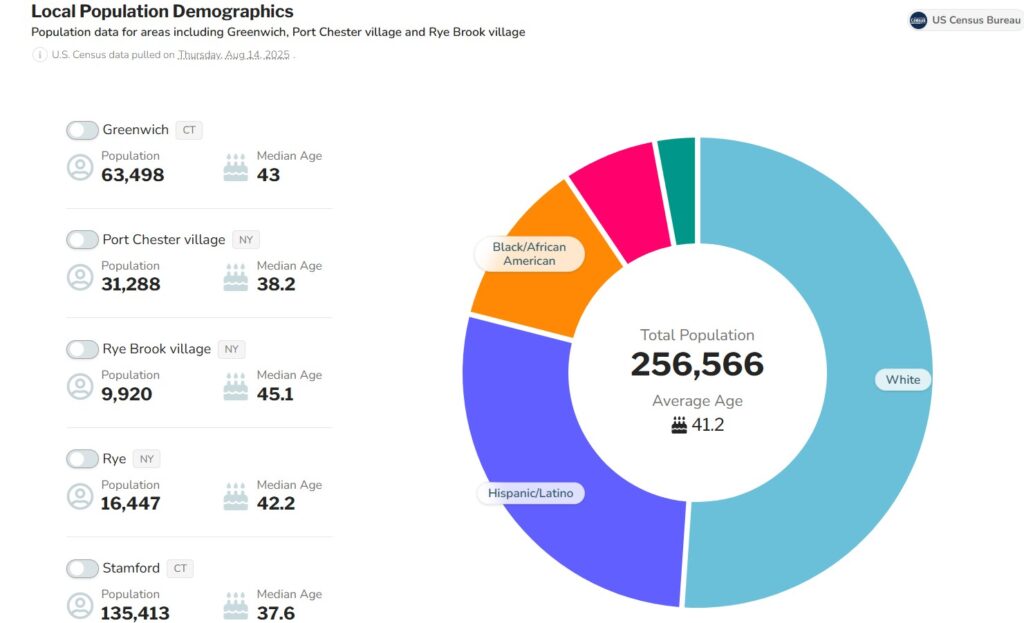
Uses demographic data (like age, income, and other household details) tied to specific locations. You can align offers, messaging, and creative with the real people who live in the area you’re targeting, not just a generic “ideal customer” sketch.
Overall, the core features are clearly built to move you from “raw data” to “clear local story” as fast as possible.
SplashDash Plan and Pricing
SplashDash offers 2 different plans.
Free Plan
The free plan is designed so agencies and freelancers can test SplashDash without any billing friction.
- 25 basic reports per month, suitable for exploring the platform and running light prospecting or a few client reports.
- Access to a limited set of report types (not the full library).
- No trial countdown; it’s “free forever,” and they do not collect a card unless you upgrade.
- Reports stay in your account as long as the account is active, and share links remain live.
Paid plan($29 per month)
The paid plan is positioned as the main working tier for agencies that need reporting at volume.
- Price: $29 per month for up to 100 premium reports per month, with the count resetting every month.
- Unlocks “all features and reports” (i.e., full report library, including advanced and premium report types like ChatGPT visibility, competitive overviews, LSA rankings, ad budget simulator, etc.).
- Designed for active local SEO agencies that run reports before pitches, during onboarding, and for ongoing client communication.
SplashDash vs the Alternatives
Here are a few of the SplashDash alternatives you can consider
- Radarkit – A stronger alternative if you care more about AI search visibility and LLM rank tracking than client-facing local SEO reports.
- AgencyAnalytics – A broader alternative when you need full cross-channel dashboards and recurring client reports, not just one-off local SEO snapshots like SplashDash.
- Local Dominator – A deeper alternative for technical local SEO audits and competitor analysis when you want more granular scoring than SplashDash’s fast overview reports.
- GMB Radar – A focused alternative if your main need is live Google Business Profile rank monitoring; SplashDash is better for packaged “state of your local presence” reports.
- BrightLocal – A full-suite alternative for agencies that want end‑to‑end local SEO management (citations, reviews, tracking), while SplashDash fits better as a lightweight reporting and presentation layer.
- Whatagraph – A higher-level alternative when you need multi-channel marketing reporting across SEO, ads, and social, whereas SplashDash stays narrow and opinionated around local SEO storytelling.
FAQs: SplashDash Review
Is SplashDash good for beginners?
Yes, it’s very beginner‑friendly. The interface and reports are designed so that even someone new to SEO can understand what’s happening and what to do next.
You don’t need to be a technical analyst to navigate the reports, interpret rankings, or talk through the visuals with a client, which makes it especially attractive for freelancers or small teams who wear many hats.
Does SplashDash replace my existing SEO tools?
No, it’s meant to complement them. Your existing tools (full SEO suites, ad platforms, etc.) are still where you do keyword research, audits, technical fixes, and campaign setup.
SplashDash sits on top of that workflow as a reporting and storytelling layer that turns complex data into clear, visual, client‑ready reports.
Can I white‑label SplashDash reports for my agency?
White‑labeling is an active focus. The platform is moving toward full white‑label capabilities, including your own logo, colors, and potentially even a custom domain for sharing reports.
That means instead of sending clients to a generic URL, you’ll be able to send them to something that looks and feels like your own reporting portal. It’s worth checking the latest state of these features when you sign up.
Is SplashDash only for U.S. businesses?
Right now, the tool is focused on the U.S. market. Much of the data it pulls, especially demographic and local signals, is optimized for U.S. locations.
If your client base is heavily international, you may find it less useful until coverage expands. If most of your clients are U.S.‑based, the focus becomes a strength because the reports are tightly tuned to that environment.
How long do SplashDash reports stay active, and are they updated automatically?
Once you generate a report, it stays in your account, and its shareable link continues to work as long as your account is active. Reports are snapshots, not live dashboards, so they don’t auto‑refresh.
If you want up‑to‑date numbers, you simply re‑run the report. For many agencies, that’s actually simpler: you know exactly when the data was pulled and can refresh it right before a meeting or monthly review.
Conclusion
Overall, SplashDash feels like a missing layer between hardcore SEO platforms and real client conversations. It isn’t trying to be everything; it focuses on being the fastest path from raw data to a persuasive local SEO story your clients actually understand.
For U.S.‑focused freelancers and agencies who spend way too much time screenshotting, exporting, and formatting SEO data, it’s absolutely worth testing the free plan and seeing how it changes your reporting workflow.