In this article, we will look into an Erlin AI Review and Alternative so you can decide whether it deserves a place in your stack and what to pick if it doesn’t
We’ll walk through how Erlin AI works, its main features, pricing, pros and cons, and then finish by covering Radarkit as the best Erlin AI alternative for teams that want a more straightforward AI visibility tracker with flexible entry-level pricing.
So without any further ado, let’s get started.
Quick Capabilities Rating
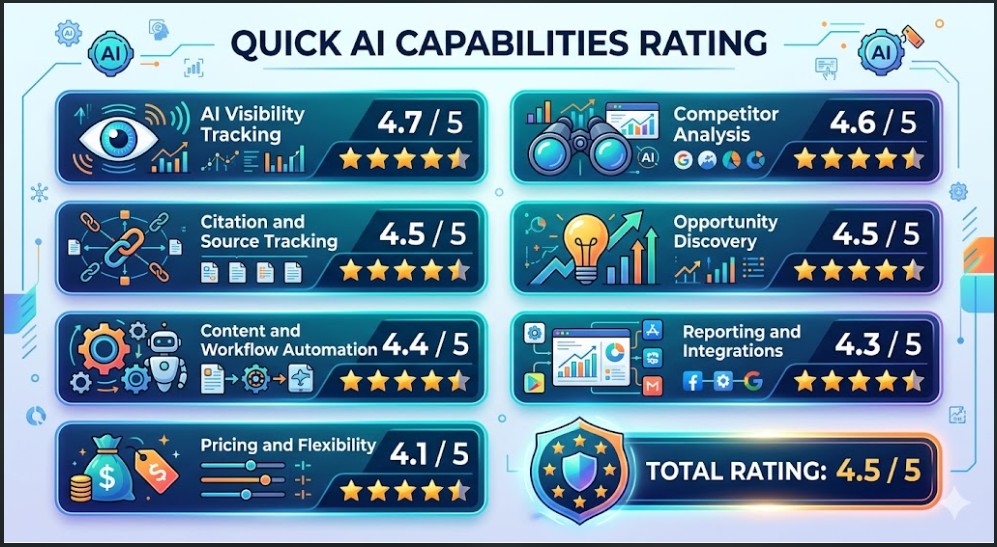
- AI visibility tracking: 4.7/5
- Competitor analysis: 4.6/5
- Citation and source tracking: 4.5/5
- Opportunity discovery: 4.5/5
- Content and workflow automation: 4.4/5
- Reporting and integrations: 4.3/5
- Pricing and flexibility: 4.1/5
- Total rating: 4.5/5
What is Erlin AI?

Erlin AI is a visibility and execution platform built around AI search. Instead of guessing how tools like ChatGPT, Perplexity, Gemini, or Claude talk about your brand, it shows you the reality: how often you’re mentioned, which questions bring you up, which pages and external sources those answers rely on, and where competitors are getting more attention than you.
On top of that, Erlin connects this AI visibility data with Google Analytics and Google Search Console, so you can see which topics and pages actually bring traffic and conversions, and where AI answers are out of sync with your current content.
The platform has three big pillars:
- Insights: Dashboards and reports that track prompts, answers, citations, share of voice, and page performance.
- Opportunities: A list of content gaps, citation gaps, competitor-owned prompts, and quick wins, prioritised by impact.
- Action Center: Workflows that turn those opportunities into tasks, briefs, and first drafts, guided by your brand voice and compliance rules.
Who Benefits from Using Erlin AI
Content and SEO teams
Content and SEO teams use Erlin to see which questions AI tools already connect with their brand and where they are completely missing.
Because Erlin pulls in GA and GSC data as well, these teams can tie AI visibility back to impressions, clicks, traffic, and conversions, instead of treating it as an isolated metric.
Growth and GTM teams
Growth and GTM teams get a clearer picture of how AI tools frame their category, their product, and their competition.
Prompt clusters, funnel tags, and competitor visibility views make it easier to spot opportunity areas, early category trends, and losing ground in important queries.
Agencies
Agencies can plug Erlin into their service stack for AI search audits, ongoing visibility tracking, and content retainers.
The multi-workspace setup and workflow tools support multiple clients without mixing their data or tasks, which is important when you manage several brands at once.
Brand and compliance teams
Brand and compliance teams benefit from Erlin’s brand context features. They can define product details, preferred language, terms to avoid, disclaimers, and other rules once, then apply those across content drafts and workflows so everything stays closer to brand and regulatory requirements.
Erlin AI Review: Key Features Explained
AI visibility tracking

Erlin tracks brand visibility across ChatGPT, Perplexity, Gemini, and other AI tools in one view. It includes mention rate, citation rate, share of voice, AI visibility score over time, and AI traffic versus traditional traffic.
Prompt-level tracking

Prompt-level tracking is one of the most useful parts of Erlin if you care about the actual language your audience uses.
The platform records the prompts it runs, the full AI answers, and the brands that appear in those answers, which means you can see the exact context in which you are mentioned or ignored.
That kind of detail helps you map real questions to content ideas, spot patterns in how AI tools describe your value proposition, and find prompts where competitors consistently show up while you’re missing.
Citation tracking

Erlin does not stop at mentions; it also looks at where those answers come from. Citation tracking shows you which blogs, documentation pages, review platforms, Reddit threads, YouTube videos, and other sources AI systems lean on when they build answers in your space.
Insights

Insights is where Erlin AI really starts to earn its keep. This view pulls together how often your brand appears inside AI assistants, which prompts trigger those mentions, how your visibility shifts over time, and how that lines up with your existing search and traffic data.
You can see metrics like mention rate, citation rate, share of voice, and an overall AI visibility score, but the part that matters is the connection to Google Analytics and Google Search Console, because that tells you whether those AI mentions actually turn into impressions, clicks, and conversions.
From here, it is easy to drill into specific prompts, answers, competitors, and landing pages, turning Insights into the base layer for everything else in Erlin.
Opportunity discovery

All of that monitoring would be overwhelming without a way to turn it into a to-do list, and that is where the opportunity discovery layer comes in. Erlin scans your prompts, answers, citations, and competitor presence to highlight content gaps, citation gaps, competitor-owned prompts, and quick wins, then ranks them by likely impact so you are not guessing what to tackle first.
Action Center

The Action Center is Erlin’s execution engine. Once you know which gaps matter, you can turn them into tasks, assign owners, set due dates, and track progress without leaving the platform, which makes it easier for teams to move from analysis to shipping.
Erlin can also generate research, briefs, and first drafts tied to those tasks, so writers, strategists, and managers are all working from the same context instead of rebuilding that work in separate documents.
Brand voice and compliance controls

Erlin stores product details, brand voice, audience context, customer sentiment, and compliance rules so drafts stay more accurate and consistent. It also says teams can define preferred wording, restricted terms, and disclaimers once, then apply those rules across content workflows.
Erlin AI Review: Plan and Pricing
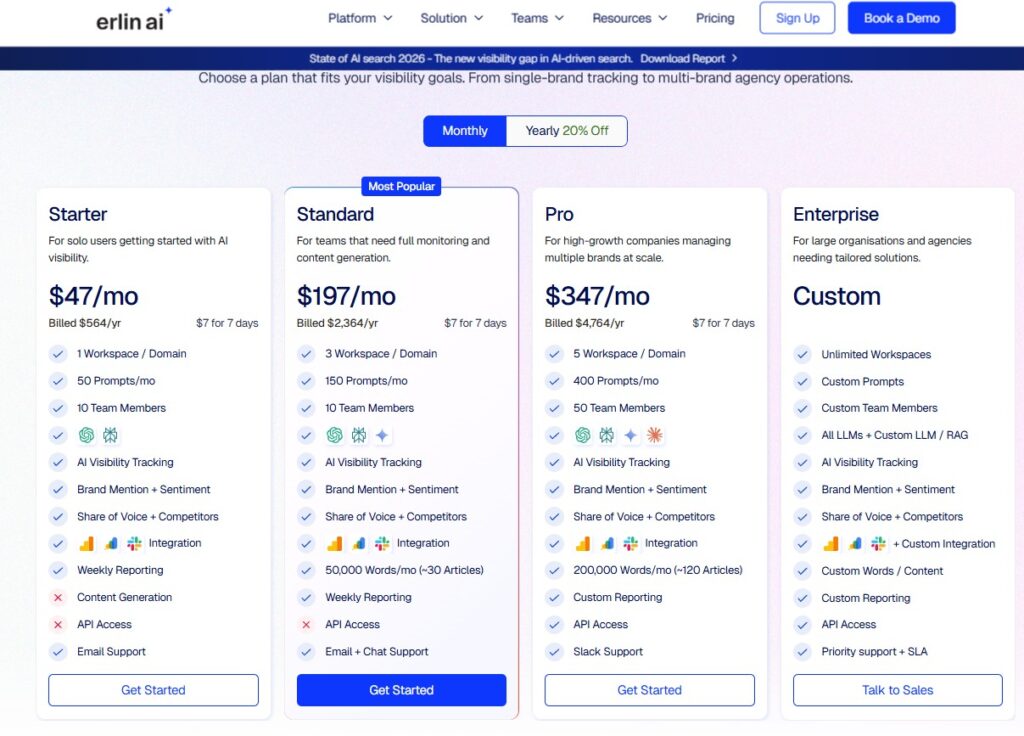
| Plan | Monthly price | Workspaces/domains | Prompts per month | Team members | Content words per month | Support type |
|---|---|---|---|---|---|---|
| Starter | $47 / month | 1 | 50 | 10 | 50,000 words | |
| Standard | $197 / month | 3 | 150 | 10 | 50,000 words | Email + chat |
| Pro* | $347 / month | 5 | 400 | 50 | 200,000 words | Slack |
| Enterprise | Custom | Unlimited | Custom | Custom | Custom | Priority + SLA |
Starter ($47/mo)
Starter is the entry-level plan aimed at solo marketers or very small teams who want to start tracking AI visibility without a heavy budget.
It gives you one workspace tied to a single brand or domain, 50 prompts a month, and enough seats for a small group to log in and share the same account.
You still get the core visibility features, sentiment and share-of-voice tracking, basic content generation, weekly summaries, and email-based support, so it works as a low-risk way to test the platform before rolling it out wider.
Standard ($197/mo)
Standard is positioned for smaller teams that need steady AI visibility tracking and a bit more content firepower. It increases capacity to three workspaces, which fits companies managing multiple websites or agencies handling a few clients, and raises the prompt limit to 150 per month.
On the content side, you get a 50,000-word allowance designed to cover roughly a few dozen articles or page updates monthly, plus weekly reports and both email and live chat support, which makes it comfortable for ongoing campaigns rather than one-off tests.
Pro($347/mo)
Pro targets high-growth teams that manage several brands or complex AI visibility programs. It expands to five workspaces, 400 prompts per month, and up to 50 users, which is more in line with in-house teams spread across markets or agencies running multiple retained clients.
The content allowance jumps to around 200,000 words a month, enough to support a serious publishing schedule, and Pro also unlocks custom reporting and Slack-based support so the platform can plug more directly into existing reporting cadences and team communication.
Enterprise (Custom)
Enterprise is built for larger organisations and agencies that need flexible limits and deeper integration. Instead of fixed caps, it offers unlimited workspaces, custom prompt and user volumes, and support for wider LLM setups, including custom LLM or RAG connections.
Teams on this tier get tailored content allowances, custom integration work, bespoke reporting, API access, and priority support backed by an SLA, which makes it the most suitable option when Erlin needs to sit at the centre of a broader data or content stack.
Erlin AI Review: Pros and Cons
Erlin AI Pros
- Gives you a clear, realistic view of how AI assistants actually talk about your brand, instead of relying on a few manual prompts or guesswork.
- Treats AI search as its own channel, with dedicated metrics, prompt views, and share-of-voice trends, which is rare compared to most “SEO-first” tools.
- Links every insight back to prompts, pages, and sources, so you can see the full chain from question to answer to the content and citations behind it.
- Turns analysis into a working backlog through its Opportunities and Action Center, so teams have a concrete list of tasks instead of static reports.
- Helps brands keep messaging and compliance consistent by baking brand voice, product context, and rules directly into its drafting workflows.
Erlin AI Cons
- Starter’s 50-prompt limit can feel restrictive once you try to track several topics, products, or competitors in parallel.
- Erlin is strong in AI search visibility, but most teams will still need a separate, full-featured SEO platform for broader keyword research and technical SEO work.
Best Erlin AI Alternative Radarkit

Radarkit is the best Erlin AI alternative if your main priority is tracking how AI assistants actually talk about your brand.
It runs real-browser sessions against tools like ChatGPT, Perplexity, Gemini, Copilot, and Google’s AI experiences, then records full answers, citations, and competitor mentions so you see exactly what a real user would see instead of relying only on APIs.
Where Erlin leans heavily into a full “measure, prioritise, execute” loop with workflows, Radarkit focuses on giving a clean, reliable view of AI answers, share of voice, and location-based results across many countries.
It also keeps entry pricing relatively low, around $29 per month, which makes it easier for smaller teams and consultants to start tracking AI visibility without committing to a large budget.
Radarkit AI Standout features
- AI Share of Voice: Identify exactly which sites AI Chatbots trust most for your query vs. competitors.
- Location-Based Tracking: Simulate real-time queries from 50+ countries using residential proxies to catch local citations and geo-specific data.
- NLP & Fact-Based Content: Create content using the specific NLP terms and entities found in most cited sources to rank in AI search engines.
- 1-Click GEO Content Writer: Generates optimized content that ranks in LLMs in 5 minutes without needing Google Search Console.
- Query Fanouts Tracking: Tracks how AI models break one question into multiple angles and turn them into content sections.
- AI Traffic Monitoring: See which AI platforms (ChatGPT, Perplexity, Gemini, Copilot) send actual visitors to your site.
FAQs
Is Erlin AI only for big companies?
No, Erlin AI is not limited to large enterprises. The Starter plan is clearly aimed at solo marketers or small teams who just want to track a single brand with a light prompt budget, while higher tiers and Enterprise cover bigger teams and agencies that need more workspaces and prompts.
Does Erlin AI replace traditional SEO tools?
Erlin AI does not replace a full SEO stack; it sits alongside it. It focuses on AI search visibility, prompts, citations, and AI-driven traffic, while tools like Ahrefs or Semrush still handle deeper keyword research, backlinks, and technical SEO needs.
Can Erlin AI help with content creation?
Yes, Erlin goes beyond reporting and includes content support. Through the Action Center, it can generate research, outlines, briefs, and first drafts for blogs, product pages, and collections, all guided by your brand context and review steps.
How does Erlin AI handle brand voice and compliance?
Erlin lets you store product details, audience info, preferred language, restricted terms, and compliance rules inside a brand context layer. Drafts and workflows then use that context, so content stays closer to your real tone and regulatory requirements instead of feeling generic.
Is Erlin AI worth testing if I’m just starting with AI search?
If you are early but serious about AI search, Erlin is worth testing because it gives you a structured way to see where you stand right now and what to fix first. The lower-tier plans keep the entry cost manageable, and you can always scale up later if AI-driven traffic becomes a bigger part of your strategy.
Final Thoughts
Erlin AI is a solid choice if you want to treat AI search as a real channel instead of an experiment. It shows you how often AI assistants talk about your brand, why they do it that way, and what to change so those answers move in your favour.
It works best for teams already using tools like GA, GSC, and a separate SEO platform, who now need a focused layer for AI visibility, prompts, and citations.
If you are ready to invest in AI search visibility, Erlin AI gives you a practical starting point, and Radarkit is the natural alternative when you want something more focused on pure tracking and reporting.