In this guide, we compare the 9 Best LLM Visibility Tracking and Analysis Tools for monitoring brand mentions, website citations, competitor performance, share of voice, sentiment, and AI search rankings.
Each platform offers a different approach to measuring how brands appear across AI-generated answers, locations, prompts, and search engines.
So, without any further ado, let’s get started
Quick Pick Criteria
-
Radarkit: Best overall for LLM visibility tracking.
-
Profound: Best for enterprise AI visibility analysis.
-
Semrush AI Visibility Toolkit: Best for SEO teams tracking AI and organic search together.
-
Ahrefs Brand Radar: Best for AI share-of-voice and citation research.
-
Peec AI: Best for prompt and competitor tracking.
-
OtterlyAI: Best for agencies and small marketing teams.
-
Scrunch AI: Best for enterprise LLM monitoring and AI traffic analysis.
-
Rankscale: Best for AI citation, sentiment, and rank tracking.
-
Keyword.com AI Visibility Tracker: Best for traditional rank-tracking users adding AI visibility data.
What Is LLM Visibility Tracking?
LLM visibility tracking is the process of measuring how often and how positively a brand appears in AI-generated answers. It helps businesses understand whether AI tools mention their company, recommend their product, cite their website, or place competitors ahead of them.
For example, a user may ask ChatGPT, “What are the best AI visibility tracking tools?” If the answer includes your brand, that is a brand mention. If it links to a page on your website, that is a citation. LLM visibility tracking helps you monitor both.
LLM visibility tracking is closely related to AI search visibility tracking, but the two terms are not the same.
-
LLM visibility tracking focuses on brand performance inside AI chatbots and answer engines.
-
AI search visibility tracking covers chatbot answers along with AI-generated search experiences, including Google AI Overviews and Google AI Mode.
-
Generative engine optimization, also called GEO, involves improving content so AI systems can understand, trust, and cite it.
-
Answer engine optimization, also called AEO, focuses on helping answer engines use your content when responding to user questions.
-
Traditional keyword rank tracking measures organic rankings in search results. It does not show whether an AI answer mentioned or cited your business.
Traditional SEO and LLM visibility tracking work well together. Google rankings can bring organic traffic, while AI visibility can help a brand appear when users ask direct questions inside answer engines.
What Should You Look for in an LLM Visibility Tool?
AI Engine Coverage
Different AI platforms do not produce the same answers. ChatGPT may recommend brands in a short list, while Perplexity often provides visible citations. Google AI Overviews may pull information from search results, and Claude can respond differently to the same question.
This means you should avoid treating every AI platform as one channel. A business may have strong visibility in Perplexity but limited visibility in Google AI Mode. Good LLM visibility tracking tools let you review platform-level performance instead of relying on one general score.
Look for tools that cover the AI platforms your audience uses. For most businesses, that includes ChatGPT, Perplexity, Gemini, Claude, Microsoft Copilot, Google AI Overviews, and Google AI Mode.
Prompt and Topic Tracking
Prompt tracking lets you monitor the specific questions that matter to your business. Rather than checking random AI answers manually, you can create a list of prompts and track them regularly.
A useful prompt list should include branded questions, category terms, comparison searches, customer problems, and local-intent queries. A project management company, for example, may track prompts such as “best project management software for agencies,” “best Asana alternatives,” and “project management tools for remote teams.”
Prompt discovery is also useful because it helps you find questions you may not have considered. Query clustering groups similar prompts together, while buyer-intent prompts help you focus on people who are comparing options or preparing to purchase.
Brand Mentions, Citations, and Share of Voice
A brand mention means an AI platform included your business, product, or website in its response. It may appear as a recommendation, a list entry, a comparison option, or a supporting example.
A citation is different. It means the AI answer references a specific page or domain. A citation can be more valuable because it may lead users to your content and show which page the AI considers useful for a topic.
Share of voice shows how visible your business is compared with competitors. If your brand appears in 20 out of 100 tracked prompts while a competitor appears in 50, the share-of-voice data makes the difference clear.
Citation quality matters too. A strong LLM visibility tracking platform should show the exact cited page, the topic it supports, and whether the citation comes from your website, a competitor site, a review site, a forum, or another third-party source.
Location, Language, and Device Accuracy
AI answers can change based on location, language, device settings, and local search intent. A user in India may receive different local business recommendations than a user in the United Kingdom or the United States.
This is especially important for multi-location businesses, local service providers, travel brands, e-commerce stores, and agencies with international clients. Country-level and city-level tracking can help reveal these differences.
Some LLM visibility tracking tools use residential proxies and real-browser sessions to collect results in a way that is closer to a real user search. This gives businesses a more realistic view of local AI answers.
Competitor Intelligence and Reporting
A good LLM visibility tracking tool should not only show your brand’s performance. It should also reveal which competitors receive more mentions, citations, and positive recommendations.
Competitor intelligence can show which topics competitors own, which pages AI platforms cite, and where your content has a chance to improve. Historical answer tracking is helpful because AI responses can change over time.
For agencies, reporting matters just as much as data collection. Look for exportable reports, client portals, white-label dashboards, alerts, historical charts, sentiment reports, and integration options for Looker Studio or Google Analytics.
9 Best LLM Visibility Tracking and Analysis Tools
| Tool | Best for | Main AI coverage | Key features | Location tracking | Reporting and integrations | Starting price |
|---|---|---|---|---|---|---|
| Radarkit | Best overall for LLM visibility tracking | ChatGPT, Perplexity, Gemini, Google AI Overviews, Google AI Mode, Copilot | Real-browser tracking, 50+ locations, Local Radar, query fanout tracking, citations, competitors, AI agents | 50+ locations, 70+ for Enterprise | GA4, Google Search Console, API, client portal, branded reports | $29/month |
| Profound | Enterprise AI visibility analysis | ChatGPT, Perplexity, Google AI Overviews, Gemini, Claude, Copilot, Grok, DeepSeek, Google AI Mode | Prompt intelligence, Answer Engine Insights, AI traffic attribution, agent analytics, Profound Agents, Profound Sheets | Custom regions and languages on Enterprise | GA4, WordPress, Cloudflare, AWS, Vercel, API, CSV, JSON, SSO | From $99/month |
| Semrush AI Visibility Toolkit | SEO teams | ChatGPT, Gemini, Perplexity, Google AI search | AI Visibility Score, prompt research, sentiment, competitor analysis, AI-ready Site Audit, SEO tools | Multi-location and device tracking on higher plans | API, Semrush reporting, SEO workflows, Enterprise integrations | From $165.17/month |
| Ahrefs Brand Radar | AI share-of-voice and citation research | AI search platforms, Google AI search, ChatGPT, Perplexity, Gemini, Copilot | 271M+ prompt database, AI share of voice, cited pages, cited domains, historical data, SEO research | Available through AI indexes and custom tracking | Ahrefs reports, API, MCP Server, Report Builder | From $199/month per AI index |
| Peec AI | Prompt and competitor tracking | ChatGPT, Perplexity, Gemini, Google AI Mode, Google AI Overviews, Copilot | Daily prompt tracking, brand mentions, citations, competitor movement, share of voice, MCP | Multi-country tracking on Advanced | Looker Studio, MCP, API and SSO on Enterprise | From $95/month |
| OtterlyAI | Agencies and small teams | ChatGPT, Perplexity, Google AI Overviews, Copilot, with other engines available as add-ons | Prompt research, Brand Visibility Index, citation analysis, GEO audits, content recommendations, Agent Analytics | 50+ countries | API, MCP, Looker Studio, agency workspaces, client reports | $29/month |
| Scrunch AI | Enterprise LLM monitoring and AI traffic analysis | ChatGPT, Claude, Gemini, Perplexity, Google AI Mode, Google AI Overviews, Meta AI | Prompt Manager, industry prompts, citations, page audits, personas, key topics, agent traffic, AXP | Custom options on Enterprise | Reporting dashboard, GA4 and agent traffic data, API, SSO | $250/month |
| Rankscale | AI citation and sentiment tracking | ChatGPT, Gemini, Perplexity, Claude, DeepSeek, Mistral, Grok, Copilot, Google AI Mode | AI rank tracking, citations, sentiment, query fanouts, shopping results, source-box analysis, Rankscale Scout | All regions included on paid plans | White-label dashboards, Looker Studio, REST API, team workspaces | $99/month |
| Keyword.com | Traditional rank-tracking users | ChatGPT, Perplexity, Gemini, Claude, Google AI search, Copilot | Google rank tracking, AI mentions, citations, share of voice, sentiment, competitors, prompt discovery, API | Available through AI visibility tracking options | API, white-label reports, unified SERP and AI dashboard | From $33/month |
1. Radarkit: Best Overall for LLM Visibility Tracking
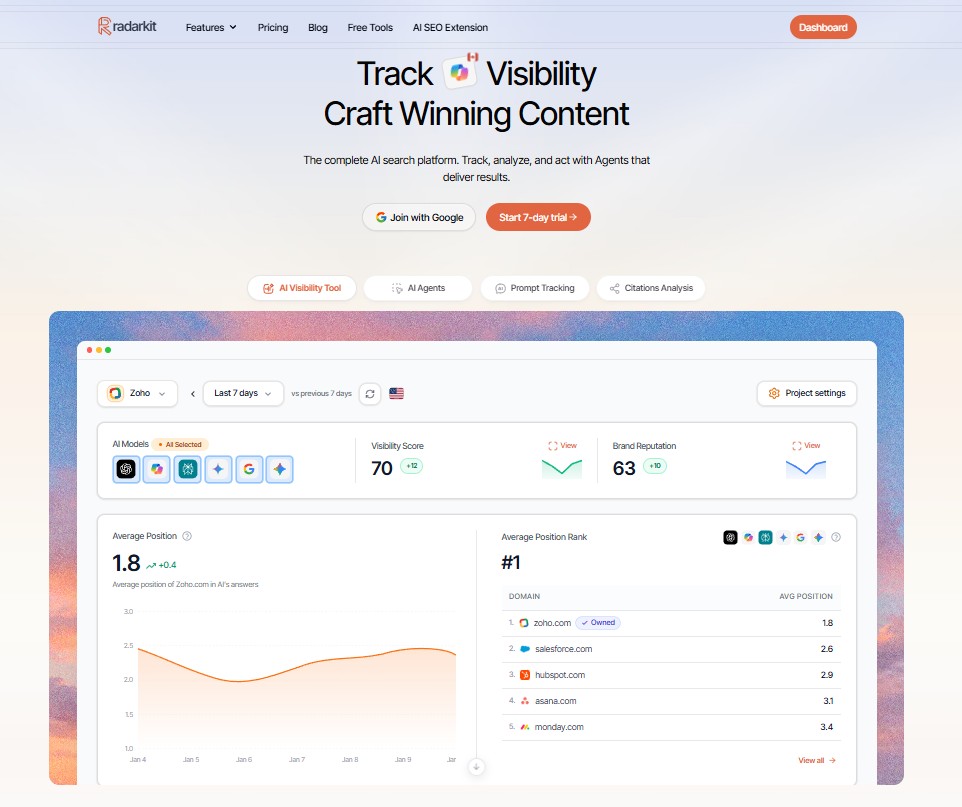
Radarkit is built for businesses that need detailed LLM Visibility tracking and monitoring across countries, locations, and major answer engines. It is a strong choice for local SEO agencies, GEO specialists, international businesses, and teams that want more than a basic mention tracker.
The platform combines LLM Visibility Tracking with AI agents for content, outreach, Reddit activity, and chat-based research. Its location coverage and real-browser approach make it particularly useful for campaigns where local accuracy matters.
Key Features
- Multi-engine tracking: Radarkit tracks ChatGPT, Google AI Mode, Google AI Overviews, Microsoft Copilot, Perplexity, and Gemini. This lets users compare brand visibility across the major AI platforms without checking each one manually.
- Real browser monitoring: Radarkit uses a UI-based approach to monitor answers through actual AI interfaces. This is useful because AI-platform results can differ from API responses, especially when location or user context affects the output.
- 50+ location tracking: Every standard plan includes tracking across more than 50 locations. Enterprise users get access to more than 70 locations. This makes Radarkit useful for brands that need country-specific or market-specific LLM visibility tracking.
- Local Radar: Local Radar focuses on how businesses appear in AI-generated local recommendations. It can show appearance rate, rank, and which businesses an AI platform recommends for local-intent prompts.
- Query fanout tracking: AI systems can expand a single question into several related searches before creating a response. Radarkit helps users study these related queries, making it easier to identify missing content topics and build pages around the full question set.
- Brand and competitor monitoring: The platform tracks brand mentions, competitor presence, citations, and share of voice. This helps users understand whether their business is included in high-value prompts and which competitors appear more often.
- Content Agent: Radarkit includes an AI Content Agent that can help users turn visibility findings into article ideas and optimization work. This is helpful when a team wants to move from tracking data to publishing better content.
- Outreach Agent: The Outreach Agent is designed to support outreach activity. It can help teams identify potential opportunities after finding citation gaps or competitor source patterns.
- Reddit Agent: The Reddit Agent is useful for brands that want to understand relevant conversations and topics on Reddit. This can support broader brand research and content planning.
- Google Search Console and Google Analytics integration: Radarkit connects with Google Search Console and Google Analytics. This helps teams compare AI visibility trends with website traffic and search performance.
- Client portal and branded reports: The platform includes client portals and branded PDF reports. Agencies can use these features to present LLM visibility tracking data without creating every report manually.
Pros and Cons
Pros
-
Tracks major AI platforms from one dashboard
-
Covers more than 50 locations on standard plans
-
Includes Local Radar and query fanout tracking
-
Provides content, outreach, Reddit, and chat agents
-
Includes Google Search Console and Google Analytics integrations
-
Offers client reporting and historical data
Cons
-
The number of tracked prompts is lower on the Lite plan
-
Smaller businesses may not need every agent feature at the beginning
Pricing
Radarkit offers a 7-day free trial. Its Lite plan costs $29 per month and includes two projects, 15 tracked prompts, 72-hour refreshes, 50+ locations, AI traffic analytics, and access to its agents.
The Growth plan costs $79 per month and includes five projects, 50 prompts, daily refreshes, and two additional seats. The Pro plan costs $139 per month for 10 projects, 100 prompts, daily refreshes, five additional seats, and priority support.
Enterprise pricing is custom. It includes unlimited projects, custom prompt tracking, 70+ locations, API access, SSO, unlimited seats, and a dedicated manager.
Who Should Use It?
Radarkit is a good fit for local SEO agencies, international brands, GEO consultants, multi-location businesses, and teams that need localized LLM visibility tracking. It is also useful for marketers who want query fanout data and AI-agent features in the same platform.
2. Profound: Best for Enterprise AI Visibility Analysis

Profound is an enterprise-focused AI visibility platform for businesses that want deep prompt intelligence, brand analysis, AI traffic attribution, and answer-engine monitoring. It is designed for larger marketing teams, SaaS companies, publishers, e-commerce brands, and agencies managing serious GEO programs.
The platform brings together AI visibility insights, agent analytics, prompt research, content support, and enterprise security features. Its pricing structure separates small-company monitoring from larger multi-platform and multi-brand programs.
Key Features
- Answer Engine Insights: Profound tracks how your brand and competitors appear in AI answers. It helps users review mentions, citations, prompt performance, and competitive visibility across supported answer engines.
- Multi-platform tracking: The Starter plan focuses on ChatGPT. Growth expands tracking to ChatGPT, Perplexity, and Google AI Overviews. Enterprise supports up to nine answer engines, including Google AI Mode, Gemini, Microsoft Copilot, Grok, DeepSeek, and Claude.
- Prompt tracking: Profound tracks selected prompts daily. Starter supports 50 unique prompts and 1,500 responses per month, while Growth includes 100 prompts and 9,000 monthly responses.
- Prompt Volumes: This feature helps users study what people are asking AI answer engines. It is useful for discovering demand patterns, finding new content ideas, and identifying topics related to products, competitors, or audience problems.
- Profound Agents: Profound includes AI agents designed for content generation, optimization, and other AEO tasks. Starter includes 100 agent credits per month, while Growth includes 400 credits.
- Profound Sheets: Profound Sheets helps teams run agent tasks at scale. This can be useful for larger content operations that want to apply research or optimization work across many prompts and pages.
- Agent Analytics: Helps users track AI-sourced traffic and attribution across their websites. It supports integrations with Google Analytics, WordPress, Cloudflare, AWS, Fastly, Akamai, Google Cloud Platform, Netlify, and Vercel.
- Data exports and API access: Growth users can export data in CSV and JSON formats. Enterprise plans include API access, which is useful for companies that want to create custom reporting dashboards or connect data with internal systems.
- Enterprise controls: Enterprise plans include SSO, SAML support, SOC 2 compliance, dedicated Slack support, custom prompt limits, multiple company tracking, and custom regions and languages.
Pros and Cons
Pros
-
Strong option for enterprise AI visibility analysis
-
Includes prompt intelligence, agent analytics, and AEO agents
-
Supports traffic attribution and several technical integrations
-
Offers custom multi-brand tracking for large organizations
-
Includes enterprise security and API access
Cons
-
Entry-level plans focus on fewer AI platforms
-
More suitable for teams with a serious AI-search budget and strategy
Pricing
Profound focuses on enterprise budgets. . . . Their Starter plan begins at $99/mo a month for ChatGPT tracking only . . . their Growth tier jumps to $399/mo . . . and they offer custom enterprise pricing.
Who Should Use It?
Profound is best for enterprise marketers, large SaaS companies, publishers, e-commerce brands, and agencies that need AI traffic attribution, prompt intelligence, enterprise security, and detailed multi-engine LLM visibility tracking.
3. Semrush AI Visibility Toolkit: Best for SEO Teams

Semrush AI Visibility Toolkit is a strong option for teams that already use Semrush for keyword research, site audits, competitor analysis, rank tracking, and content planning. It allows users to add AI visibility data to an existing SEO workflow.
Instead of keeping traditional SEO and AI search reporting in separate platforms, Semrush brings them together. This makes it easier for SEO teams to compare organic performance, AI mentions, citations, sentiment, and content opportunities.
Key Features
- AI visibility reports: Semrush helps users measure how a brand appears in AI search. It tracks AI visibility reports for domains, monitors sentiment, and shows performance across relevant AI prompts.
- Custom prompt monitoring: Starter plans include 50 prompts tracked daily. Pro+ includes 100 prompts, while Advanced includes 200 prompts. This gives teams flexibility based on their topic coverage and reporting needs.
- AI brand performance: The toolkit lets users track a specific domain’s AI brand performance. This is useful for understanding how a business appears in AI-generated answers over time.
- AI sentiment monitoring: Semrush helps users monitor the tone associated with a brand in AI responses. This can reveal whether a company is often described as affordable, premium, beginner-friendly, agency-focused, or enterprise-ready.
- Prompt research: Prompt research helps teams find questions that users ask AI platforms. It can support content planning, topic research, competitor analysis, and buyer-intent targeting.
- AI-ready Site Audit: Semrush includes AI-ready audit features that can help users review technical issues and content accessibility. This is useful when a website needs clearer structure, stronger internal linking, or better AI-search readiness.
- SEO and AI search in one account: Semrush includes keyword research, position tracking, site auditing, competitor analysis, content tools, and AI visibility tracking. This is one of its biggest advantages for established SEO teams.
- Multi-location and device tracking: Pro+ plans include multi-location and device tracking. This is useful for businesses that want to monitor SEO and AI visibility across different markets.
- API integration: Advanced plans include API data integration. This can help agencies and larger teams pull Semrush data into custom reporting systems.
- Enterprise automation: Semrush Enterprise offers large-scale AI prompt tracking, multi-brand visibility, custom integrations, advanced workflows, forecasting, ROI attribution, and dedicated support.
Pros and Cons
Pros
-
Combines AI visibility data with wider SEO tools
-
Supports daily prompt monitoring
-
Includes sentiment reports and AI-ready site audits
-
Useful for agencies and in-house SEO teams
-
Offers API access on higher plans
Cons
-
May be more expensive than a dedicated entry-level LLM visibility tracking tool
-
Users who only need AI monitoring may not need the full SEO platform
Pricing
Semrush offers a free plan with limited AI visibility features and 10 reports per day.
The Starter SEO + AI Search plan costs $165.17 per month when billed annually, or $199 month to month. It includes 50 tracked AI prompts, one domain for AI brand performance, 300 AI visibility reports per day, and AI-ready site audits.
Pro+ costs $248.17 per month when billed annually, or $299 monthly, with 100 daily tracked prompts. Advanced costs $455.67 per month when billed annually, or $549 monthly, with 200 daily tracked prompts and API integration.
Who Should Use It?
Semrush AI Visibility Toolkit is best for SEO agencies, in-house SEO teams, content marketers, and businesses already using Semrush. It is a good choice for teams that want LLM visibility tracking alongside keyword research, site audits, traditional rank tracking, and content planning.
4. Ahrefs Brand Radar: Best for AI Share of Voice Tracking

Ahrefs Brand Radar is designed for brands that want detailed AI visibility research, cited-source analysis, share-of-voice tracking, and connection with wider SEO data. It is a useful choice for content-led businesses, publishers, digital PR teams, and established SEO professionals.
The platform is different from many basic AI trackers because it combines prompt research with cited-domain data, web visibility, and broader brand research.
Key Features
- Brand Radar AI: Ahrefs lets users research brand visibility across AI prompts and track custom AI questions. It is built around a large prompt database and supports research across major AI search surfaces.
- Prompt database: Brand Radar AI gives users access to more than 271 million organic prompts, along with custom AI prompt tracking. This helps teams find relevant questions beyond a manually created prompt list.
- Custom AI prompt tracking: Ahrefs plans include a limited number of tracked AI prompts. Lite includes five prompts, Standard includes 10, Advanced includes 20, and Enterprise starts from 83 prompts.
- Share of voice: The tool helps users measure how often a brand appears compared with competitors. This is useful for understanding market presence across selected topics, products, and questions.
- Citations analysis: Ahrefs can identify which pages and domains are cited in AI answers. This helps teams find pages that influence AI recommendations and study competitor content patterns.
- Historical performance: Users can review AI visibility trends over time. This makes it easier to connect changes with new content, PR activity, site updates, or competitor movement.
- Traditional SEO data: Ahrefs includes Site Explorer, Keywords Explorer, Rank Tracker, Site Audit, backlink data, content research, and competitor analysis. This allows users to review LLM visibility tracking alongside traditional SEO performance.
- Report Builder: Ahrefs offers a Report Builder add-on for teams that need scheduled reports and custom widgets. This can be useful for agencies and in-house reporting.
- API and MCP Server: Higher Ahrefs plans include API access and MCP Server access. These are useful for businesses that want to connect Ahrefs data with custom systems or AI workflows.
Pros and Cons
Pros
-
Strong AI share-of-voice and citation research
-
Connects AI visibility with SEO, backlinks, and keyword data
-
Offers a large prompt research database
-
Includes custom prompt packages
-
Useful for digital PR and content research
Cons
-
Brand Radar can become costly when adding high prompt volumes
-
Best value often comes from using Ahrefs for wider SEO work too
Pricing
Ahrefs Lite costs $129 per month and includes five tracked AI prompts. Standard costs $249 per month and includes 10 tracked AI prompts. Advanced costs $449 per month and includes 20 tracked AI prompts. Enterprise costs $1,499 per month with custom limits and uncapped API access.
Brand Radar AI is also available as a standalone product from $199 per month. Custom prompt packages start at $50 per month for 2,500 checks, $100 for 7,000 checks, and $250 for 25,000 checks.
Who Should Use It?
Ahrefs Brand Radar is best for SEO professionals, digital PR teams, publishers, content-led companies, and brands that want to study AI visibility alongside citations, backlinks, competitor pages, keyword data, and web mentions.
5. Peec AI: Best for Prompt and Competitor Tracking

Peec AI is a dedicated AI-search visibility platform for SEO and content teams. It focuses on prompt monitoring, competitor analysis, brand performance, and AI platform tracking without adding a large traditional SEO suite around it.
The platform is useful for companies that want a clean workflow for tracking how they appear in AI search. It is also well suited to marketing teams that manage multiple products, regions, or client projects.
Key Features
- Prompt tracking: Peec AI tracks selected prompts daily. Starter includes 50 prompts, Pro includes 150 prompts, and Advanced includes 350 prompts.
- Model selection: Starter, Pro, and Advanced users can choose three AI models for tracking. This lets teams focus on the platforms most relevant to their audience and market.
- AI platform coverage: Peec AI supports ChatGPT, Google AI Mode, Google AI Overviews, Microsoft Copilot, Perplexity, and Gemini. Enterprise users can add Claude Sonnet 4, GPT-5 Search, DeepSeek, Qwen, Mistral, and other supported models.
- Brand visibility monitoring: The platform helps users track whether their brand appears in AI answers. It can show trends, prompt-level performance, and gaps where competitors receive more attention.
- Competitor tracking: Peec AI lets users compare their performance with competitors across the same prompts. This can reveal who dominates a category, what content competitors are cited for, and where new pages may help.
- Citation analysis: The platform helps identify citations used by AI platforms. This gives marketers a clearer view of what sources are shaping AI answers.
- Multi-country tracking: Advanced plans include multi-country support. This is useful for companies that operate in several regions and want to monitor country-level AI visibility.
- Looker Studio integration: Advanced users can connect data with Looker Studio. This helps agencies and marketing teams create custom dashboards for internal reporting or client updates.
- MCP integration: Peec AI supports MCP integration, allowing teams to connect AI visibility data with tools that support the Model Context Protocol.
- API access and SSO: Enterprise plans include API access, SSO, unlimited projects, custom prompt tracking, and support for up to 11 LLM models.
Pros and Cons
Pros
-
Strong focus on prompt and competitor tracking
-
Includes daily tracking across selected AI models
-
Supports unlimited users on standard plans
-
Advanced plans include multi-country tracking and Looker Studio
-
Enterprise plans include API access and SSO
Cons
-
Standard plans include only three selected models
-
Teams tracking many countries or models may need a higher plan
Pricing
Peec AI’s Starter plan starts at $95 per month and includes 50 prompts, three selected models, unlimited users, daily tracking, and one project. Pro costs $245 per month and includes 150 prompts, three models, unlimited users, daily tracking, and two projects.
Advanced costs $495 per month and includes 350 prompts, five projects, multi-country support, Looker Studio integration, and daily tracking. Enterprise pricing is custom and includes unlimited projects, custom prompt tracking, API access, SSO, and up to 11 tracked LLM models.
Who Should Use It?
Peec AI is a good option for SaaS companies, content teams, SEO specialists, GEO consultants, and marketing teams that need detailed prompt and competitor tracking across major AI platforms.
6. OtterlyAI: Best for Agencies and Small Teams

OtterlyAI is an AI search monitoring platform that combines brand tracking, citation analysis, prompt research, GEO audits, recommendations, reporting, and agent analytics. It is a strong choice for agencies, freelancers, small businesses, and content teams that want practical AI-search insights.
The platform offers lower-cost entry plans while still including useful reporting and research features. Higher plans add API access, MCP access, agent analytics, more prompts, and a greater number of audits.
Key Features
- AI search engine tracking: OtterlyAI tracks ChatGPT, Google AI Overviews, Perplexity, and Microsoft Copilot on all standard plans. Claude, Google AI Mode, and Gemini are available as paid add-ons.
- Daily prompt monitoring: Lite includes 15 search prompts, Standard includes 100, and Premium includes 400. Each plan tracks prompts daily.
- Brand Visibility Index: The Brand Visibility Index provides an overall view of brand presence across monitored AI search results. It helps users see whether visibility is improving or declining.
- Domain Ranking: OtterlyAI tracks how a website appears in AI results. This can help users compare their domain with competitors and identify pages with stronger AI-search presence.
- Link Citations Analysis: The platform analyzes which pages AI platforms cite. This is useful for understanding why a competitor appears in answers or which pages on your site already earn citations.
- AI Prompt Research Tool: OtterlyAI helps users discover prompts related to their business. This can make it easier to build prompt groups around product categories, comparisons, local queries, and audience problems.
- Generative Engine Optimization Audit: The GEO Audit checks how well a page is prepared for AI search. It can help users identify content gaps, weak page structure, missing information, and other areas worth improving.
- Recommendations: OtterlyAI provides AI-search recommendations based on the tracked data. Lite includes three recommendations per week, while Standard, Premium, and Enterprise plans include unlimited recommendations.
- Multi-country support: All plans support tracking across more than 50 countries. This is useful for agencies and brands that need location-specific LLM visibility tracking.
- Agent Analytics: Standard and Premium plans include Agent Analytics. This feature helps users study AI agent activity and related events.
- API, MCP, and Looker Studio: Standard and Premium plans include API access, MCP access, and Google Looker Studio support. These features are useful for custom reporting and automated workflows.
Pros and Cons
Pros
-
Starts at an accessible monthly price
-
Includes daily tracking and unlimited team members
-
Offers GEO audits, prompt research, and citation analysis
-
Supports 50+ countries
-
Includes API, MCP, and Looker Studio on higher plans
-
Provides agency-focused workspaces and reporting options
Cons
-
Claude, Gemini, and Google AI Mode require extra add-ons
-
Lite plan has a lower 15-prompt limit
Pricing
OtterlyAI Lite costs $29 per month and includes 15 search prompts, four AI engines, daily tracking, one workspace, multi-country support, prompt research, citation analysis, GEO audits, and three recommendations each week.
Standard costs $189 per month and includes 100 prompts, unlimited workspaces, unlimited recommendations, API access, MCP access, Google Looker Studio support, 5,000 GEO URL audits, and 200,000 Agent Analytics events each month.
Premium costs $489 per month and includes 400 prompts, 10,000 GEO URL audits, 5,000 API requests, 5,000 MCP requests, and one million Agent Analytics events. Enterprise plans start from $1,000 per month and include custom tracking, SSO, personalized onboarding, and a dedicated customer success manager.
Who Should Use It?
OtterlyAI is best for agencies, freelance marketers, smaller SEO teams, and businesses that want LLM visibility tracking with content audits, GEO recommendations, citation analysis, and practical reporting features.
7. Scrunch AI: Best for Enterprise LLM Monitoring

Scrunch AI is designed for businesses that want to track their presence across AI platforms and understand how AI traffic reaches their websites. It combines prompt monitoring, citation analysis, content audits, AI agent traffic, and persona-based reporting.
The platform is a good choice for mid-sized companies, enterprise marketing teams, publishers, e-commerce brands, and agencies that need detailed AI-search reporting.
Key Features
- Prompt Manager: Scrunch centralizes prompts so users can create, organize, test, and monitor AI-search questions from one place. This makes it easier to manage branded prompts, comparison prompts, product questions, and customer journey queries.
- AI platform monitoring: Scrunch tracks ChatGPT, Claude, Gemini, Perplexity, Google AI Mode, Google AI Overviews, and Meta AI. This gives teams a broad view of LLM visibility tracking across important answer engines.
- Custom prompts: Starter includes 350 custom prompts, while Growth includes 700 custom prompts. Enterprise plans include custom prompt limits.
- Industry prompts: Scrunch also includes industry prompts. Starter includes 1,000 industry prompts, while Growth includes 2,500. These can help users compare their brand against broader topic trends.
- Citations tracking: The platform shows when and how AI platforms cite a brand or website. This helps teams identify pages that influence AI answers and find citation gaps.
- Page Audits: Scrunch audits pages for AI visibility. Starter includes five page audits, Growth includes 10, and Enterprise has custom audit limits. These audits help identify page-level improvements that may support AI search performance.
- Key Topic monitoring: Users can track key topics without a fixed limit. This helps teams organize AI visibility around products, categories, industry themes, and customer questions.
- Personas: Scrunch supports personas so teams can study prompts and customer journeys from different audience perspectives. Starter includes three personas, while Growth includes five.
- Agent traffic monitoring: This feature helps users attribute visits from AI-driven sources. It can show how AI search contributes to website traffic and supports measurement beyond simple mention counts.
- AXP: Scrunch includes an Agent Experience Platform, also called AXP. It is designed to create an AI-friendly version of a website for AI-driven experiences.
- Reporting dashboard: The reporting dashboard helps users review performance trends, prompt movement, citations, visibility changes, and AI traffic data.
- Enterprise controls: Enterprise plans include SSO through SAML or OIDC, Enterprise Data API access, custom limits, dedicated support, and advanced security options.
Pros and Cons
Pros
-
Strong prompt capacity on self-serve plans
-
Includes citation tracking, page audits, personas, and agent traffic
-
Tracks several major AI search platforms
-
Supports AI traffic measurement and website optimization
-
Includes customer success and onboarding support
Cons
-
Higher starting cost than basic AI-search monitoring tools
-
Better suited to businesses with a larger prompt strategy and content library
Pricing
Scrunch offers Starter, Growth, and Enterprise plans. Starter costs $250 per month, while Growth costs $417 per month with annual billing or $500 month-to-month. Enterprise pricing is custom and includes higher limits, multiple brands, API access, SSO, and dedicated support. Scrunch also offers a seven-day free trial of the Starter plan.
Who Should Use It?
Scrunch AI is best for enterprise marketing teams, publishers, larger SaaS companies, agencies, and businesses that need detailed LLM visibility tracking alongside AI agent traffic, content audits, personas, and conversion-focused reporting.
8. Rankscale: Best for AI Citation and Sentiment Tracking

Rankscale is an AI rank-tracking platform that monitors brand presence across many AI engines. It is useful for businesses that want detailed data around AI rankings, citations, competitor performance, sentiment, regions, query fanouts, and shopping results.
The platform uses a credit system, which gives teams flexibility. Users can create unlimited search terms, but each AI engine query uses credits based on tracking frequency and selected engines.
Key Features
- Broad AI engine coverage: Rankscale supports ChatGPT, Gemini, Perplexity, Claude, DeepSeek, Mistral, Grok, Copilot, Google AI Mode, and other AI engines. This makes it useful for teams that want wider coverage than a few major platforms.
- Flexible tracking frequency: Users can schedule monitoring hourly, daily, weekly, or monthly. This is useful because some high-value prompts may require frequent checks, while lower-priority prompts can be tracked less often.
- Brand dashboards: Rankscale lets users create separate dashboards for different brands. Pro includes 10 brand dashboards, Growth includes 50, and Enterprise includes 100.
- Visibility performance tracking: The platform tracks brand visibility scores and other performance metrics across monitored AI engines. This helps users identify trends instead of reviewing every answer manually.
- Competitor benchmarking: Rankscale compares your brand against competitors in AI search results. This helps reveal share-of-voice gaps and prompt groups where competitors appear more often.
- Citation analysis: The tool shows which sources AI engines cite when mentioning your brand or competitors. It also helps identify the most authoritative cited sources.
- Sentiment analysis: Rankscale reviews the tone and sentiment in AI answers. This can show whether AI platforms associate your business with positive, neutral, or less favorable descriptions.
- Prompt research: The platform helps users explore prompts and user intent by segment, location, and language. This is useful for building a more complete LLM visibility tracking strategy.
- Query fanout tracking: Rankscale tracks how AI systems expand queries to gather information. This can reveal connected subtopics and help content teams build stronger topic coverage.
- Shopping analysis: The platform can analyze shopping card results in ChatGPT and other AI engines. This is useful for e-commerce brands that want to monitor product visibility.
- Sources box analysis: Rankscale can analyze the source boxes shown next to AI answers. This helps users identify sources that influence recommendations and study competitor citation patterns.
- Rankscale Scout recommendations: Rankscale Scout provides AI-based recommendations from the collected data. It can help users interpret visibility changes and identify areas to improve.
- Agency reporting: Growth and Enterprise plans support white-label dashboard links, Looker Studio exports, REST API access, team workspaces, and agency resources.
Pros and Cons
Pros
-
Supports many AI engines
-
Includes citation, sentiment, and competitor analysis
-
Offers hourly, daily, weekly, and monthly tracking
-
Includes query fanout and shopping analysis
-
Supports white-label reporting and REST API access on higher plans
-
Uses credits that can roll over to future billing periods
Cons
-
Credit-based pricing requires careful planning for high-volume tracking
-
The many reporting options may take time for beginners to understand
Pricing
Rankscale’s visible plans include Pro at $99 per month, Growth at $385 per month, and Enterprise at $780 per month. Pro includes 1,200 monthly credits, 10 brand dashboards, 50 page audits, unlimited search terms, all regions, and monitoring across multiple AI engines.
Growth includes 5,500 credits, 50 dashboards, 200 page audits, white-label dashboard links, and REST API access. Enterprise includes 12,000 credits, 100 dashboards, 200 page audits, API access, and dedicated support. Rankscale also offers custom plans for businesses that need higher credit volumes, SSO, custom integrations, or tailored support.
Who Should Use It?
Rankscale is best for GEO consultants, agencies, affiliate marketers, e-commerce brands, and businesses that want wide AI engine coverage, citation analysis, sentiment tracking, query fanouts, shopping results, and flexible reporting.
9. Keyword.com: Best for Rank Tracking Users

Keyword.com AI Visibility Tracker is a good choice for SEO professionals who want traditional Google rank tracking and AI-search monitoring in one platform. It is especially useful for agencies that need a simple way to report on Google rankings, AI visibility, citations, sentiment, and competitor performance.
The platform supports both dedicated AI visibility plans and combined 360° Visibility plans for businesses that want Google SERP data and AI search data together.
Key Features
- AI brand mention tracking: Keyword.com tracks whether a brand appears in AI-generated answers. It helps users see which prompts create visibility and where competitors are more visible.
- Citation detection: The platform identifies when AI answers cite a website. This can help users understand which pages are being used by AI platforms and which competitor pages are cited more often.
- AI share of voice: Keyword.com tracks share of voice across selected AI prompts. This helps users compare their presence with competitors and understand broader topic-level visibility.
- Competitor analysis: Users can monitor direct competitors across AI answers. This helps identify missing topics, content gaps, and brand categories where competitors dominate.
- Sentiment tracking: The platform measures the sentiment attached to AI brand mentions. This helps teams understand how AI platforms describe their products and services.
- Prompt discovery: Keyword.com helps users find relevant AI prompts. This is useful for building topic groups around product categories, customer problems, comparison queries, and local-intent questions.
- Historical tracking: The tool stores visibility data over time. This makes it easier to review changes after publishing new content, updating pages, or improving brand coverage.
- Traditional rank tracking: Keyword.com also tracks Google keyword rankings. This allows SEO teams to compare standard organic rankings with visibility across AI search platforms.
- AI rank tracker API: The AI Visibility Tracker API gives users programmatic access to AI visibility metrics. Agencies and enterprise teams can use it for custom dashboards, internal tools, and automated reporting.
- White-label reporting: The platform supports agency reporting workflows. This is useful for professionals who want to present AI visibility data alongside normal SEO ranking reports.
Pros and Cons
Pros
-
Combines AI visibility and Google rank tracking
-
Includes citations, sentiment, share of voice, and competitor analysis
-
Provides agency reporting and API access
-
Offers dedicated AI plans and combined visibility plans
-
Supports several major AI platforms
Cons
-
Credit limits should be planned carefully for larger prompt groups
-
Teams focused only on enterprise AI monitoring may need more advanced technical features
Pricing
Keyword.com offers a 360° Visibility plan that starts at $33 per month and combines Google rank tracking with AI search visibility.
The 360° Visibility plan includes 1,000 tracked keywords and 15 AI visibility credits at the $33 monthly level.
Who Should Use It?
Keyword.com AI Visibility Tracker is best for SEO agencies, rank-tracking users, freelance SEO professionals, and marketing teams that want Google SERP tracking and LLM visibility tracking in one reporting workflow.
Steps to Measure LLM Visibility Properly
Build Prompt Groups Around Search Intent
Start by creating prompt groups based on how customers ask questions. Do not track only branded prompts because that will not show how your business performs in broader category searches.
Create separate groups for branded terms, product categories, comparisons, customer problems, local intent, and high-buying-intent queries. A software company may track branded prompts, “best software” prompts, competitor comparison prompts, and problem-solving prompts.
This gives your LLM visibility tracking campaign a clearer structure. It also makes reporting easier because you can identify which topic group is growing and which one needs more work.
Add 3 to 5 Real Competitors
Choose competitors that target the same audience and appear in the same buying conversations. Avoid adding unrelated large brands just because they are well known.
Track your own brand alongside three to five real competitors. This shows which businesses receive the most AI mentions, citations, and recommendations for your important prompts.
Competitor data is useful for finding content opportunities. If a competitor appears for “best AI visibility tool for agencies” but your business does not, review the cited pages and identify what information your own site may need.
Track the Right Metrics
Do not focus only on whether your brand was mentioned. A full LLM visibility tracking process should measure several metrics together.
Track brand mentions to see how often your business appears. Track citations to identify whether AI platforms link to your pages. Review answer position to see whether your brand appears first, in the middle, or near the end of a recommendation list.
Also monitor share of voice, sentiment, competitor presence, cited pages, topic coverage, and location-level performance. These metrics give a more complete picture of AI visibility.
Keep AI Platforms Separate
ChatGPT, Perplexity, Gemini, Claude, Google AI Mode, and Google AI Overviews should not be treated as identical channels. Each platform can produce different brand recommendations, sources, and answer styles.
Review results by platform first. Then create an overall report only after you understand where your brand is strong or weak.
For example, a company may earn citations in Perplexity because it has detailed guides, while Google AI Overviews may prefer different page types. Platform-level data helps you make better content decisions.
Review Changes Every Week
AI answers can change frequently. A competitor may gain a citation after publishing a new comparison page, or your business may begin appearing after improving a key guide.
Review LLM visibility tracking data every week. Look for sudden drops, new citations, new competitor appearances, sentiment changes, and prompts where your business moved into or out of the answer.
Avoid reacting to one small change. Focus on patterns that continue across several checks and affect important prompt groups.
Connect AI Visibility With GA4
Brand mentions are useful, but qualified traffic and conversions matter more. Connect your LLM visibility tracking work with Google Analytics 4 to see whether AI platforms are sending visitors to your website.
Review AI referral traffic, engagement, lead submissions, trial signups, sales, and other conversion actions. This helps you understand whether improved AI visibility is bringing valuable visitors.
Over time, this data can help you decide which AI platforms, prompt groups, content types, and GEO activities produce the strongest business results.
Frequently Asked Questions
What is the best LLM visibility tracking tool?
Radarkit is the best overall LLM visibility tracking tool for businesses that want to monitor brand mentions, citations, competitors, and AI search performance across multiple locations. Its support for more than 50 countries, real-browser tracking, query fanout monitoring, and Local Radar feature makes it especially useful for local SEO agencies, international brands, and GEO professionals.
What does an LLM visibility tracking tool measure?
An LLM visibility tracking tool measures how often your brand appears in AI-generated answers. It can track brand mentions, website citations, answer position, sentiment, competitor presence, and share of voice across platforms such as ChatGPT, Perplexity, Gemini, Claude, and Google AI search.
How is LLM visibility different from traditional SEO rankings?
Traditional SEO rankings show where your webpage appears in Google’s organic search results. LLM visibility tracking shows whether AI platforms mention, recommend, or cite your brand when users ask relevant questions. A business can rank well for a keyword but still have limited visibility inside AI-generated answers.
Which prompts should I track for my business?
Track a mix of branded, category, comparison, problem-focused, buyer-intent, and local prompts. Branded prompts show how AI platforms describe your business, while non-branded prompts reveal whether users can discover you when they have not decided which company to choose.
How often should I check my LLM visibility?
Weekly monitoring is a practical starting point for most businesses. Larger companies, agencies, and brands working in competitive categories may benefit from daily monitoring, especially for important commercial prompts. Regular tracking helps identify changes in mentions, citations, competitors, and answer positioning.
Can LLM visibility tracking show whether AI search brings website traffic?
Some platforms can connect AI visibility data with Google Analytics, referral traffic, and conversion data. This helps you see whether AI mentions and citations lead to website visits, enquiries, signups, purchases, or other valuable actions.
Final Thoughts
LLM visibility tracking gives businesses a clearer view of how they appear in AI search. It shows whether ChatGPT, Perplexity, Gemini, Claude, Google AI Overviews, and other platforms mention your brand, cite your content, or recommend your competitors instead.
The right tool depends on your goals. Radarkit is a strong choice for location-based tracking and query fanout analysis, while Profound and Scrunch are better suited to enterprise teams. Semrush and Ahrefs work well for SEO professionals who want AI visibility data alongside traditional search insights, while Peec AI, OtterlyAI, Rankscale, and Keyword.com offer focused options for prompt tracking, citations, reporting, and competitive research.
Start with a focused group of important prompts, track real competitors, and review results regularly. When you connect LLM visibility tracking with website traffic and conversions, AI search becomes easier to measure and turn into a practical part of your marketing strategy.